
Content
System integration connects separate applications, data stores, devices, or business processes so they can exchange information and coordinate work. A successful integration does more than move data. It defines which system owns each piece of information, what happens when a dependency fails, and how teams can trace a transaction across the entire flow.
System integration connects independent applications, data stores, devices, and services so they can exchange information and coordinate a business process. A production-ready integration also defines ownership, contracts, security, failure handling, monitoring, and support.
This guide separates three decisions that are often mixed together: what is being integrated, how connections are arranged, and which communication method carries the data or command. It compares point-to-point, hub-and-spoke, API-led, event-driven, and batch patterns, then explains an eight-step implementation process.
The central example follows an ecommerce order through payment, ERP, warehouse management, CRM, and analytics. It shows why a reliable integration needs more than connectors: each system requires a clear role, and the flow must remain traceable and recoverable when one dependency fails.
Consider an online order. The ecommerce platform accepts the order, a payment provider authorizes it, an ERP records the sale, a warehouse management system reserves stock, a shipping service creates a label, and a CRM updates the customer record. If employees have to copy the order between those systems, the process is not integrated. If the systems exchange validated messages and recover predictably from errors, they are.
This guide focuses on IT system integration: its types, architecture patterns, communication methods, implementation process, and operating practices.
What is system integration?
System integration is the practice of connecting independent technology components so they work as part of a coordinated business process. The components may include SaaS applications, custom software, databases, APIs, on-premises platforms, cloud services, partner systems, and devices.
Microsoft’s integration architecture guidance describes integration as connecting applications, data, services, and devices across cloud, on-premises, and edge environments. It also separates direct API calls from asynchronous messaging and events. That distinction matters because the connection method affects latency, coupling, recovery, and cost.
System integration has four practical jobs:
- transfer data in an agreed format;
- coordinate actions across system boundaries;
- preserve business rules and ownership;
- make failures visible and recoverable.
The last two jobs are often missed. A connector can move a customer record from a CRM to an ERP, but the integration remains unreliable if nobody has decided which system can change the billing address or how duplicate records are resolved.
Planning or fixing a system integration?
Get support with integration architecture, delivery, migration, error handling, and production recovery.
Talk through the systems, constraints, and failure modes before committing to a solution.

Talk through the systems, constraints, and failure modes before committing to a solution.
System integration vs application integration vs data integration
The terms overlap, but they are not interchangeable.
| Term | Main purpose | Typical outcome |
|---|---|---|
| System integration | Coordinate technology components and business processes | An order moves through sales, payment, fulfillment, and finance |
| Application integration | Connect application functions and workflows | A CRM creates a support case in a service platform |
| Data integration | Combine, transform, or synchronize data | Customer and transaction data is prepared for reporting |
| B2B integration | Exchange documents and events across company boundaries | A supplier receives purchase orders and returns acknowledgments |
| API integration | Use defined application interfaces to exchange data or invoke capabilities | An ecommerce application requests a shipping quote |
One project can include all five. A B2B order flow may use APIs for status requests, EDI for purchase orders, event messages for internal updates, and an analytical pipeline for reporting.
A system integration example: order to cash
An order-to-cash flow shows why integration is a design problem rather than a single connection.
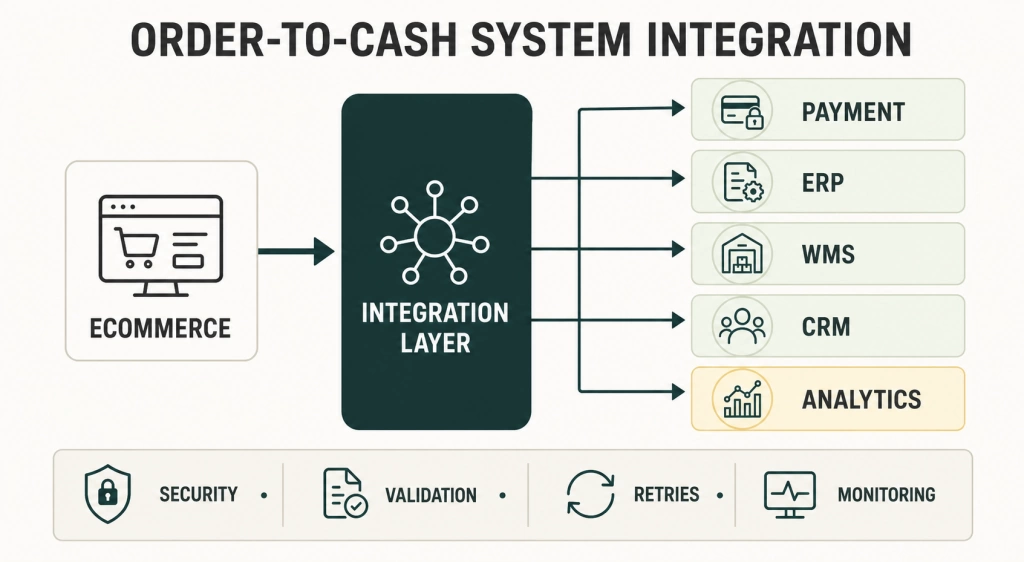
The ecommerce platform should not need custom knowledge of every downstream system. It can publish an accepted order or call a stable integration interface. The integration layer validates the payload, maps identifiers, routes work, records status, and handles temporary failures.
Ownership still matters. The ecommerce platform may own the original cart, the payment provider owns authorization status, the ERP owns the posted invoice, and the warehouse system owns pick and pack status. Copying all fields in both directions without ownership rules creates loops and conflicts.
Types of system integration
Types describe what is being connected. They do not prescribe a specific tool or topology.
Enterprise application integration
Enterprise application integration connects systems such as ERP, CRM, HR, ecommerce, warehouse management, and service platforms. The goal is usually a cross-application workflow, not a unified database.
Data integration
Data integration moves and transforms information for reporting, analytics, machine learning, synchronization, or consolidation. Common mechanisms include ETL, ELT, change data capture, batch files, and streaming pipelines. Data integration may support a system integration, but it does not necessarily trigger business actions.
B2B integration
B2B integration connects an organization with suppliers, distributors, logistics providers, banks, marketplaces, and other partners. It often needs partner onboarding, document standards, acknowledgments, certificates, nonrepudiation, and support for different communication protocols.
Cloud and hybrid integration
Hybrid integration connects cloud services with on-premises applications or data. Network boundaries, identity, private connectivity, latency, and legacy protocols become part of the design. Moving a workload to the cloud does not remove these dependencies.
IoT and operational technology integration
IoT and OT integration connects devices, controllers, gateways, and enterprise applications. These environments may have intermittent connectivity, high event volume, strict timing, long equipment lifecycles, or safety constraints. The integration model should reflect those conditions rather than copying a SaaS pattern.
Common system integration architecture patterns
Architecture patterns describe how connections are arranged and where integration logic lives.
Point-to-point integration
A point-to-point integration creates a direct connection between two systems. It is often the fastest option when there are only two endpoints and the interface is stable.
The cost appears as the environment grows. If each application connects independently to every other application, mappings, credentials, retries, and monitoring become scattered. A change in one system may require updates in several connections.
Use point-to-point integration for a limited, well-owned flow. Avoid treating it as an enterprise default.
Hub-and-spoke integration
Hub-and-spoke routes communication through a central integration layer, such as an enterprise service bus or an integration platform as a service. The hub can handle routing, transformation, orchestration, policy enforcement, and common monitoring.
This reduces duplicated logic but creates a platform that needs clear ownership and capacity planning. If every small change waits for one central team, the hub becomes an organizational bottleneck even when the technology scales.
API-led integration
API-led integration exposes capabilities and data through managed interfaces. An API gateway can centralize authentication, rate limits, routing, logging, and version policies. Microsoft’s basic enterprise integration reference architecture shows an API gateway in front of workflows and backend services.
APIs work well when a consumer needs an immediate response or a controlled way to request an action. They also create runtime coupling: if the called system is slow or unavailable, the caller must wait, fail, or fall back.
Event-driven integration
In an event-driven design, producers announce that something happened and consumers react independently. Microsoft defines the core roles as event producers, event channels or brokers, and event consumers in its event-driven architecture guidance.
Events reduce direct dependencies and support multiple consumers, but they introduce eventual consistency and operational questions. Teams must define delivery guarantees, ordering needs, duplicate handling, replay, retention, and schema evolution.
File and batch integration
Scheduled file exchange remains appropriate for large data sets, partner standards, and processes that do not need an immediate response. SFTP, object storage, EDI, and managed file transfer are common examples.
Batch is not automatically obsolete. A dependable nightly settlement file may be better than a fragile real-time flow when the business closes its books once a day.
System integration methods and when to use them
Methods describe how information or commands cross the boundary between systems.
| Method | Best fit | Main tradeoff |
|---|---|---|
| Synchronous API call | The caller needs an immediate answer | Caller depends on the availability and response time of the provider |
| Webhook | A provider can notify a known consumer about a change | Delivery, authentication, retries, and duplicate handling need design |
| Message queue | Work can be processed asynchronously by one consumer group | The business process becomes eventually consistent |
| Publish-subscribe event | Several independent consumers may react to the same event | Ordering, replay, and schema evolution become operational concerns |
| Event stream | High-volume ordered events need continuous processing | Requires stream governance, partition strategy, and consumer management |
| Batch file or EDI | Large or standards-based exchanges can run on a schedule | Feedback and correction are slower |
| Database replication or CDC | Downstream systems need database changes with low source impact | Raw changes do not provide business meaning by themselves |
| RPA or screen automation | A legacy application has no supported interface | UI changes can break the automation, so monitoring and an exit plan are necessary |
Most enterprise processes use more than one method. An API may accept an order and return a confirmation while a queue performs fulfillment asynchronously. A data pipeline can later move the completed transaction into analytics.
How to integrate systems in eight steps
1. Define the business outcome and boundary
Name the process, users, systems, trigger, expected result, and exclusions. Replace vague goals such as “connect CRM and ERP” with a testable outcome: “When Sales marks an opportunity as won, create a customer and draft order in the ERP within five minutes, or route the record to an exception queue.”
Set service expectations for latency, availability, volume, recovery, retention, and support hours. A payroll file and a checkout payment call should not share the same assumptions.
2. Inventory systems and constraints
For each endpoint, document the owner, interface, authentication method, rate limits, maintenance windows, payload limits, network location, data classification, and change process. Inspect real payloads. Interface documentation often misses nulls, legacy codes, duplicate identifiers, and date conventions.
3. Decide ownership and contracts
Choose the system of record for each business entity and, where necessary, each field. Define canonical identifiers, required fields, validation rules, units, time zones, and conflict handling.
Publish versioned API or event contracts. Backward compatibility is usually cheaper than coordinating simultaneous releases across every consumer.
4. Choose the pattern and communication method
Use synchronous calls when the requester needs an immediate answer. Use queues when work can continue independently and needs buffering. Use events when several consumers may react to a fact. Use batch when volume and schedule favor it.
Do not start with a preferred platform. Start with latency, coupling, delivery, security, and ownership requirements, then select the architecture and product.
5. Design failure behavior
Distributed systems fail partially. A payment may succeed while the response times out. A warehouse may accept an order while the status callback is delayed. The design must state what happens next.
Define timeouts, retry limits, exponential backoff, circuit breakers, idempotency keys, dead-letter handling, replay, compensation, and manual intervention. Microsoft’s Retry pattern warns that retrying a non-idempotent operation can execute it more than once. RFC 9110 provides the formal HTTP definition of idempotency.
6. Build security into every connection
Use separate machine identities, least-privilege scopes, managed secret storage, short-lived credentials where possible, encryption in transit, input validation, and audit logs. Apply authorization to objects and business actions, not only to the API endpoint.
The OWASP API Security Top 10 includes broken object-level authorization, unrestricted resource consumption, sensitive business flows, inventory problems, and unsafe consumption of third-party APIs. These risks are directly relevant to integration endpoints.
NIST’s Zero Trust Architecture treats users, applications, and other non-human entities as subjects that request access to resources. An internal integration should not receive broad trust merely because it runs inside the corporate network.
7. Test the process, not only each connector
Connector tests confirm that two endpoints can communicate. End-to-end tests confirm that the business process remains correct.
Test valid flows, malformed payloads, duplicates, out-of-order events, timeouts, expired credentials, rate limits, downstream outages, schema changes, replay, and recovery after partial completion. Reconcile important totals and statuses against systems of record.
8. Deploy, observe, and govern
Use automated deployment and version control for integration code and configuration. Add metrics for throughput, latency, failure rate, retry volume, queue age, and business outcomes. Propagate a correlation ID so support teams can follow one transaction across services.
Assign owners for interfaces, mappings, alerts, exceptions, credentials, and partner communication. Review unused connections and old contract versions. An integration that nobody owns becomes a production incident waiting for a source-system upgrade.
Reliability and error handling best practices
Reliable integration is designed around partial failure. These practices apply across platforms:
- Set explicit connection and processing timeouts.
- Retry only failures that may be transient.
- Add backoff and jitter so many failed messages do not retry at once.
- Make state-changing operations idempotent or add deduplication.
- Put messages that exceed retry limits in a dead-letter queue with enough context to investigate.
- Preserve replayable inputs where business and privacy rules allow it.
- Distinguish a technical retry from a business exception that needs a decision.
- Use circuit breakers to stop calling a dependency that is persistently failing. Microsoft’s Circuit Breaker pattern explains how this prevents repeated calls while a service recovers.
- Reconcile outcomes. A message marked as delivered does not prove that the business transaction was posted correctly.
AWS’s comparison of SQS, SNS, and EventBridge illustrates why queues, publish-subscribe messaging, and event buses solve different communication problems even though all three decouple components.
Common system integration challenges
Integration problems usually appear at the boundaries between teams and systems. The most common failures involve meaning, legacy constraints, dependency behavior, message processing, security, and ownership.
-
Semantic mismatch
Two systems can use the same field name for different business meanings. Define ownership, lifecycle, identifiers, units, and mapping rules before building the connection.
-
Legacy interfaces
Older platforms may expose files, database tables, SOAP services, terminal screens, or vendor-specific protocols. Wrap them behind a controlled interface where possible and monitor any RPA fallback closely.
-
Tight coupling and partial failure
A chain of synchronous calls can turn one slow dependency into a process-wide outage. Use timeouts, queues, retries, circuit breakers, and compensation according to the business process.
-
Duplicate and out-of-order processing
Networks retry and brokers redeliver. Add idempotency, deduplication, version checks, and ordering rules where duplicate or late messages can change the result.
-
Security and operational ownership
Every connection creates identities, permissions, logs, alerts, credentials, and support work. Maintain an interface inventory and assign owners for failures, changes, replay, and partner communication.
These issues need design decisions and named owners. A connector or platform cannot decide which system owns a customer field, whether a duplicate order is safe, or who resolves a failed partner exchange.
IT Systems Integration Services You Might Find Useful

System Integrations Consulting Services
Plan the architecture, delivery model, and operating controls for an integration that fits your business process.

Business Ideation Consulting
Clarify the business case, scope, assumptions, and success measures before committing to implementation.

Integration Maintenance Services
Keep production integrations stable with monitoring, incident response, troubleshooting, and structured change support.
Benefits of system integration
The value of integration depends on the process it changes. Common outcomes include:
- less manual re-entry and fewer handoff errors;
- shorter time between an event and the next business action;
- consistent status across customer-facing and operational systems;
- better traceability for orders, payments, documents, and partner exchanges;
- reuse of governed interfaces instead of repeated custom connections;
- controlled access to legacy capabilities during modernization.
Measure these benefits against a baseline. Useful metrics include manual touches per transaction, exception rate, processing time, failed messages, reconciliation differences, incident recovery time, and the cost of onboarding another system or partner.
Build, buy, or use an integration partner?
A custom integration can fit a narrow domain and give a team full control. It also leaves that team responsible for connectors, runtime, security, monitoring, upgrades, and support.
An iPaaS or managed integration product can shorten delivery with connectors, workflow tools, monitoring, and governance. Licensing and platform constraints still need evaluation. A prebuilt connector rarely eliminates data mapping, ownership, testing, or error design.
An external system integrator is most useful when the flow crosses several platforms or organizations, the current environment is poorly documented, legacy systems need specialist knowledge, or a failing integration requires independent diagnosis. The engagement should transfer documentation and operating knowledge rather than create permanent dependence.
Multishoring provides IT integration services and consulting for architecture, implementation, migration, and recovery. Organizations that already have a platform but lack a clear picture of its risks can start with an integration audit. For partner and document exchange, see B2B integration services.
Frequently asked questions
What does system integration mean?
System integration means connecting independent applications, data stores, devices, or services so they can exchange information and coordinate a business process. It also defines ownership, failure handling, security, and monitoring across those connections.
What are the main types of system integration?
Common types include enterprise application integration, data integration, B2B integration, cloud and hybrid integration, and IoT or operational technology integration. These types describe what is connected. Point-to-point, hub-and-spoke, API-led, and event-driven describe how the architecture is arranged.
What is an example of system integration?
In ecommerce, an accepted order can trigger payment authorization, ERP posting, warehouse reservation, shipping, CRM updates, and analytics. Each system keeps responsibility for its own part of the transaction while the integration coordinates the flow and handles errors.
What is the difference between an API and system integration?
An API is an interface that lets software request data or functionality. System integration is the broader design that connects systems and processes. It may use APIs along with queues, events, files, EDI, CDC, or other methods.
What are the three common system integration architecture patterns?
Three widely used patterns are point-to-point, hub-and-spoke, and event-driven integration. API-led integration is also common and can coexist with any of them. The best choice depends on latency, coupling, delivery, ownership, and operational requirements.
How long does a system integration project take?
Duration depends on the number and quality of interfaces, business-rule complexity, security review, test environments, data cleanup, partner coordination, and recovery requirements. Estimate discovery, contract design, implementation, testing, deployment, and operational handover separately.
Final takeaway
System integration is successful when a business process remains correct across system boundaries, including during failure. Connecting endpoints is only the visible part. Ownership, contracts, security, retries, observability, and support determine whether the connection can be trusted in production.


