
Content

How you configure networking in Azure Data Factory determines whether your data pipelines are genuinely secure – or just firewall rules away from a breach.
Most Azure Data Factory deployments don’t start with a security-first design. Teams provision a factory, connect a few data sources, and ship pipelines fast. Public endpoints stay open. Firewall rules get added reactively. Before long, you have a fragmented security posture with no clear picture of where data actually travels.
That approach carries real risk. Ransomware, regulatory scrutiny, and zero-trust mandates have made data security in motion a boardroom conversation – not just an IT task. Data residency requirements in healthcare, finance, and manufacturing mean it’s no longer acceptable to assume that a pipeline is secure because it works.
Azure Data Factory (ADF) is Microsoft’s serverless data integration service for orchestrating data ingestion from on-premises systems, SaaS applications, and Azure-native services. It’s powerful – but its default configuration leans toward convenience, not security. Locking it down properly requires deliberate decisions about networking: specifically, where your integration runtime runs, how private endpoints are configured, and whether traffic ever touches the public internet.
Private endpoints, managed virtual networks (Managed VNets), and self-hosted integration runtimes – used correctly – keep all data traffic on the Microsoft backbone, prevent data exfiltration to unauthorized destinations, and satisfy most compliance requirements without heavy custom networking work.
This article walks through how these components fit together, which secure ingestion patterns to use for different source types, and what concrete best practices apply across any ADF architecture. Examples draw on Multishoring’s work designing and implementing secure best practices for ADF architectures for enterprise clients across manufacturing, logistics, and finance.
Secure ADF architecture, without the retrofitting pain.
We design it right the first time – Managed VNets, private endpoints, hybrid connectivity, and monitoring built in from the start.
Your data stays off the public internet. Full stop.

Your data stays off the public internet. Full stop.
ADF Networking Building Blocks for Private Connectivity
Before choosing a connectivity pattern, you need to understand four core components. Getting these wrong – or treating them as implementation details – is what leads to insecure architectures that are expensive to fix later.
Integration Runtime: The Bridge Between ADF and Your Data
The Integration Runtime (IR) is the compute engine ADF uses to move and transform data. Think of it as the bridge between your pipelines and the actual data sources. Where the IR runs determines everything about your networking options.
There are two types relevant to private connectivity:
- Azure Integration Runtime (Azure IR) – fully managed by Microsoft, runs inside the Microsoft network. Can be enabled with a Managed Virtual Network for private connectivity to Azure PaaS services.
- Self-Hosted Integration Runtime (Self-Hosted IR) – runs on a VM you control, either on-premises or in your own Azure VNet. Required when you need to reach private network resources, meet specific IP requirements, or route traffic through your own firewall.
The choice between the two isn’t just technical – it has direct implications for management overhead, compliance posture, and cost.
Managed Virtual Network and Managed Private Endpoints
For most new ADF projects, Managed VNet + managed private endpoints should be your default starting point.
A Managed Virtual Network is an isolated, Microsoft-managed VNet where the Azure IR runs. You don’t manage routing, peering, or NSGs for the runtime itself – Microsoft handles the underlying network infrastructure.
Inside that Managed VNet, you create managed private endpoints – private connections to Azure PaaS data stores like Azure Storage, Azure SQL Database, Synapse Analytics, Cosmos DB, and others. Each managed private endpoint assigns a private IP address to the target resource, so all traffic between ADF and that data store stays on the Microsoft backbone and never crosses the public internet.
Two security benefits stand out:
- Built-in data exfiltration protection. When Managed VNet is enabled, ADF blocks outbound traffic to public endpoints from the runtime. There is no accidental fallback to a public route if a private endpoint fails.
- Reduced networking complexity. You don’t need to design custom VNet peering or NSG rules for the ADF runtime itself – the managed layer handles it.
Private Endpoints for Accessing ADF Itself
There’s a distinction worth making: managed private endpoints connect ADF outbound to data stores. But you can also put a private endpoint on the ADF service itself – meaning access to the ADF portal and authoring environment travels over a private IP, not the public internet.
This matters in organizations with strict requirements that even monitoring and authoring traffic must stay off public networks. It’s also relevant when you need to restrict portal access to specific VNets – for example, limiting ADF Studio access to corporate network users only.
One practical note: if you run multiple ADF factories with portal private endpoints inside the same hub VNet, you’ll need to manage separate private DNS zones per factory to avoid name resolution conflicts.
Self-Hosted IR with VPN or ExpressRoute
Self-Hosted IR becomes the right choice in specific scenarios:
- You’re ingesting from on-premises databases or file shares that can’t be reached over the Microsoft backbone
- Regulatory requirements mandate that all data traffic passes through your own firewall before reaching Azure
- You need a static outbound IP to allowlist on a source system
The typical pattern: Self-Hosted IR runs in your on-premises network or in an Azure VM connected via VPN or ExpressRoute. It then uses private endpoints to reach PaaS targets on the Azure side – so the hybrid leg stays in your network, and the Azure leg stays off the public internet.
The trade-off is management overhead. Self-Hosted IR nodes require patching, monitoring, and VM maintenance. For high availability, you need multiple nodes in a cluster. It works well – but it’s more to own than Managed VNet IR.
Our Data Consulting Services You Might Find Interesting

Data Warehouse Consulting Services
We design, build, and modernize data warehouses that bring order to your fragmented data.

Modern Data Architecture Services
We design and implement data architectures that replace aging legacy systems with a scalable cloud foundation.

Data Governance Consulting & Integration
We help you build a practical system of trust around your information. We work with you to make sure your data is accurate.
Secure Data Ingestion Patterns with Private Endpoints
The building blocks from previous section combine into three practical patterns – one for each major source type you’ll encounter in a real ADF project. Choosing the right pattern early saves significant rework later.
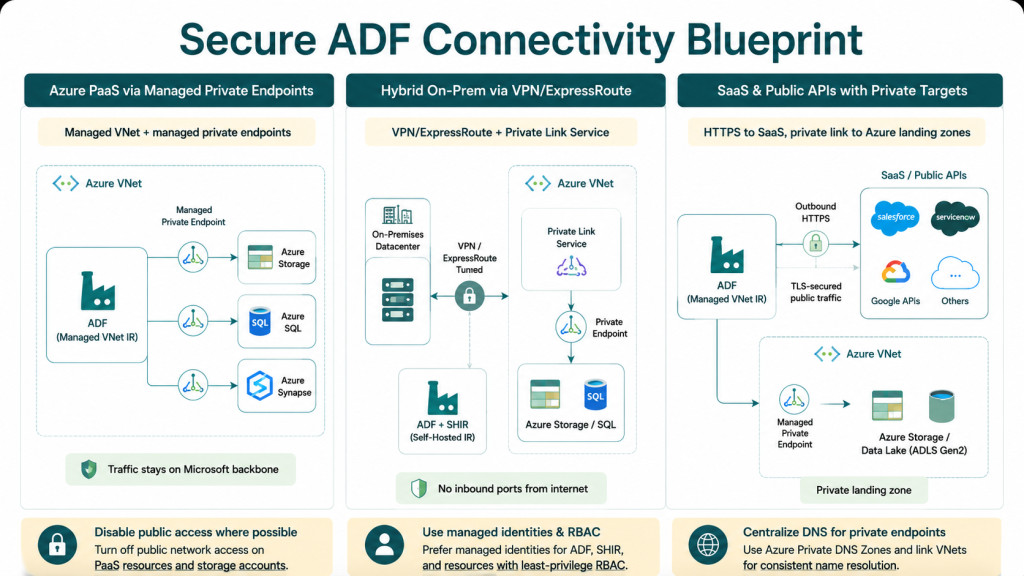
Pattern 1: Ingesting from Azure PaaS Data Stores via Managed Private Endpoints
This is the cleanest and most straightforward pattern. Use it whenever your data sources are Azure-native: Storage accounts, Azure SQL Database, Data Lake Storage Gen2, Synapse Analytics, Cosmos DB, or similar PaaS services.
How it works at a conceptual level:
- Enable Managed VNet on your Azure Integration Runtime in ADF
- For each data store, create a managed private endpoint from within ADF and approve it on the target resource
- Disable public network access on each data store – don’t leave public endpoints open as a fallback
- Use managed identities for authentication against data stores and Key Vault – no shared keys, no passwords stored in linked services
Once this is in place, all ingestion traffic stays inside the Microsoft backbone. There is no path from ADF to your data that crosses the public internet.
For Storage accounts and Key Vault, Microsoft also supports a trusted services bypass – a complementary option worth knowing about, though private endpoints are still the preferred default for production workloads.
Pattern 2: Ingesting from On-Premises or IaaS Sources
When data lives on-premises – SQL Server, ERP systems, file shares – or in an IaaS environment in a VNet not managed by ADF, the architecture requires a hybrid connectivity layer.
Two viable approaches:
- Managed VNet IR + Private Link Service – ADF’s Managed VNet IR connects through a Private Link Service to an on-premises SQL or IaaS resource inside a customer-managed VNet connected via VPN or ExpressRoute. No inbound ports need to be opened from the internet.
- Self-Hosted IR in the on-premises network – the IR runs inside your network, moves data locally, and uses private endpoints on the Azure side to land data in PaaS targets like Data Lake or Synapse.
In both cases, the security principle is the same:
- All traffic stays in private channels – VPN tunnel, ExpressRoute circuit, or private endpoint
- Firewalls follow a deny-by-default, allow-by-exception model with specific service tags and FQDN filters for ADF
- No inbound ports are opened from the internet to on-premises systems
In client projects, Multishoring typically combines the Self-Hosted IR pattern with hub-and-spoke VNet design – centralizing firewall rules and DNS resolution in a shared hub while keeping workload traffic isolated in spokes. This simplifies governance when multiple factories or teams share the same network infrastructure.
Pattern 3: Handling SaaS and Public APIs
Not every data source supports Private Link. SaaS platforms – Salesforce, ServiceNow, third-party APIs – require outbound connections over the public internet. That’s a reality, not a failure.
The right approach here isn’t to block SaaS connectivity – it’s to minimize the attack surface around it:
- Enforce HTTPS/TLS for all outbound SaaS connections without exception
- Use Azure IR static IP ranges or Self-Hosted IR to restrict outbound access on the SaaS side where the platform supports IP allowlisting
- Apply scoped API keys and OAuth with least-privilege permissions – never broad service accounts
- Where possible, keep SaaS connectors on a separate IR from the one used for Azure PaaS ingestion
Critically: even when SaaS endpoints require public connectivity, your Azure data stores don’t have to. The landing zone where SaaS data arrives – typically a Storage account or Data Lake – can still be fully private via managed private endpoints. This limits the blast radius if a SaaS credential is ever compromised.
The diagram below summarizes the most common secure connectivity patterns for Azure Data Factory data ingestion.
Best Practices for Designing Secure ADF Connectivity
Patterns tell you what to build. Best practices tell you how to build it without creating problems six months later. The following recommendations apply across all three ingestion patterns – and most of them need to be decided before you write a single pipeline.
Network Architecture and Isolation
The most common mistake in ADF projects isn’t a misconfigured endpoint – it’s starting without a network design. Retrofitting private connectivity into a running factory is painful and disruptive.
Get these decisions right from day one:
- Make Managed VNet the default for any new Azure IR. The incremental complexity is low; the security gain is significant.
- Use hub-and-spoke network topology. A centralized hub holds shared services – DNS resolvers, Azure Firewall, ExpressRoute gateways. Spoke VNets handle workload traffic. ADF private endpoints are exposed in the appropriate spoke, not scattered across subscriptions.
- Configure private DNS zones for every private endpoint and link them to the relevant VNets. This is a step teams regularly skip – and when they do, name resolution silently falls back to public endpoints. Your data is now traveling a route you didn’t intend.
- Separate dev, test, and production into distinct ADF instances and resource groups. Mixing environments in a single factory increases blast radius and complicates least-privilege access control.
Data Exfiltration Protection and Access Control
Private endpoints close the inbound door. These practices close the outbound one.
| Practice | What to do | Why it matters |
|---|---|---|
| Disable public network access | Turn off public endpoints on all data stores once private endpoints are live | Firewall IP rules alone are not sufficient – a misconfigured rule or leaked IP can still expose data |
| Use managed identities | Authenticate ADF against data stores and Key Vault using managed identity, not shared keys or passwords | Eliminates credential sprawl and reduces risk of secret leakage in linked service configs |
| Apply least-privilege RBAC | Restrict who can create private endpoints, approve connections, and modify linked services in ADF | Limits the damage from a compromised account or insider threat |
| Enable Managed VNet exfiltration protection | When Managed VNet and managed private endpoints are active together, ADF blocks all outbound public traffic from the runtime | Prevents pipelines from accidentally or maliciously sending data to unauthorized external destinations |
| Store secrets in Key Vault | Never hardcode credentials or connection strings in ADF linked services | Centralizes secret rotation and audit trail; required for most compliance frameworks |
Monitoring, Troubleshooting, and High Availability
Security posture degrades silently without monitoring. A private endpoint that gets misconfigured or a Self-Hosted IR node that goes offline won’t announce itself – you find out from missing data or a failed pipeline at 2am.
Build observability in from the start:
- Enable diagnostic logs and metrics for ADF integration runtimes and stream them to Log Analytics. Set alerts on connection failures and endpoint approval events.
- Watch for three specific warning signs: frequent connection failures, any fallback to public endpoints (if still enabled), and unexplained copy duration spikes that may indicate network path issues.
- For Self-Hosted IR deployments, run a minimum of two nodes in a cluster for high availability. Monitor node health actively and keep IR software updated – outdated nodes are both a reliability and security risk.
- Use Azure Monitor and Microsoft Defender for Cloud to detect anomalies in network traffic, including unusual connection attempts through private endpoints.
The table below summarizes which monitoring tool covers which concern:
| Concern | Recommended tool |
|---|---|
| Pipeline failures and copy activity errors | ADF Monitor + Log Analytics |
| Private endpoint approval and change events | Azure Activity Log |
| IR node health and software version | ADF Integration Runtime monitoring |
| Network anomalies and threat detection | Microsoft Defender for Cloud |
| Firewall rule hits and denied traffic | Azure Firewall logs / NSG flow logs |
When Secure ADF Connectivity Gets Complex – and What to Do About It
Private endpoints are straightforward in a demo. In production, with multiple VNets, hybrid connectivity, compliance requirements, and three teams sharing the same factory, they get complicated fast.
DNS misconfiguration breaks name resolution. Managed private endpoint approvals get missed. Self-Hosted IR nodes go stale. Hub-and-spoke topology decisions made in week one create bottlenecks in month six.
This is where most ADF security gaps actually come from – not a lack of awareness, but the compounding complexity of getting all the pieces to work correctly together, at scale, under real delivery pressure.
Multishoring specializes in exactly this. Our Azure Data Factory practice designs and implements secure data ingestion architectures for enterprise clients across manufacturing, logistics, and finance – including:
- Hub-and-spoke ADF network topologies with Managed VNets and private endpoints
- Hybrid connectivity patterns using VPN, ExpressRoute, and Self-Hosted IR for on-premises data
- RBAC hardening, managed identity setup, and Key Vault integration
- Monitoring frameworks and operational runbooks for ongoing health and compliance audits
If you’re designing a new ADF data ingestion platform – or untangling one that grew organically – talk to Multishoring’s ADF team. We’ll help you build it right the first time.
Conclusion – Key Takeaways
Secure data ingestion in ADF is not a pipeline problem – it’s a networking and identity design problem. The decisions you make about integration runtimes, private endpoints, and VNet topology determine your actual security posture. Make them deliberately, make them early, and make them the default – not an afterthought.
For most Azure-native workloads, the answer is straightforward:
Managed VNet + managed private endpoints, public access disabled, managed identities for authentication, and private DNS configured correctly. For hybrid and on-premises sources, add VPN or ExpressRoute with Self-Hosted IR where needed. For SaaS, enforce TLS and keep your Azure landing zones private regardless.
The patterns exist. The tooling is mature. The main risk now is not knowing which pattern fits your situation – or starting without a design and retrofitting security later. Getting this right from day one is faster, cheaper, and far less disruptive than fixing it under compliance pressure down the road.


