
Content

Why Hadoop Holds Back Industry 4.0 in Manufacturing
If your manufacturing data platform still runs on Hadoop, it is slowing down your Industry 4.0 roadmap – and costing you more than you think.
Most manufacturers did not build their Hadoop clusters with predictive maintenance, real-time OEE dashboards, or AI-driven quality analytics in mind. They built them for batch reporting. And for a while, that was enough.
Industry 4.0 means connected factories, IIoT sensors generating data every millisecond, and business decisions that need answers in minutes – not hours. It means running machine learning models against live production data, detecting quality anomalies before a defective batch ships, and giving plant managers dashboards they can actually act on. Legacy Hadoop was not designed for any of that.
The Hadoop tax manufacturers are paying right now
Hadoop is expensive to maintain. Not just in licensing or hardware – in people, time, and opportunity cost.
Consider what running a Hadoop cluster actually requires in 2026:
- Specialist admin teams to manage HDFS, YARN, Hive, HBase, Oozie, Ranger, and Kerberos – often as separate, loosely integrated components
- Hardware refresh cycles that trigger six- and seven-figure capital decisions every few years
- Upgrade projects that take months and freeze development velocity
- Support contracts that continue to climb as Cloudera and similar vendors consolidate
And after all that cost and complexity, you still get a platform optimized for batch processing – not for the streaming, iterative ML, and self-service analytics that Industry 4.0 demands.
The Databricks Lakehouse changes the equation
The Databricks Lakehouse Platform combines the scalability of a data lake with the performance and reliability of a data warehouse – on open, cloud-native infrastructure. Built on Delta Lake and governed by Unity Catalog, it replaces the patchwork of Hadoop components with a single platform for ETL, SQL analytics, streaming, and machine learning.
The business case is well-documented. A Forrester Total Economic Impact study commissioned by Databricks reported a 417% ROI with payback in under six months, productivity improvements of 25% or more for data teams, and pipelines running up to 9x faster than on legacy architectures. For manufacturers, that translates to faster time-to-insight on the metrics that drive production quality, uptime, and supply chain performance.
Migrating to Databricks is a technical project. Getting value from that migration – quickly – requires connecting the new data platform to the people who need to make decisions with it.
That is where Multishoring comes in. As an expert in Power BI solutions for the manufacturing industry, Multishoring helps industrial clients design the reporting and analytics layer on top of Databricks – OEE dashboards, downtime root cause analysis, scrap and yield tracking, and supply chain visibility – built directly on Databricks SQL Warehouses using DirectQuery and Direct Lake patterns.
The rest of this article covers:
- How Databricks Lakehouse differs from Hadoop – and why the difference matters specifically for manufacturing
- A practical migration strategy – from assessment through phased execution
- A technical deep dive – migrating HDFS, Hive, Spark, Oozie, and governance components
- How to measure success – and position your team for what comes after migration
Ready to migrate your Hadoop platform to Databricks?
Do not let legacy Hadoop hold back your Industry 4.0 roadmap. Our experts assess your Hadoop environment, build a phased migration plan, and execute the move to Databricks Lakehouse.
Start your migration assessment today.

Start your migration assessment today.
From Legacy Hadoop to the Databricks Lakehouse for Industry 4.0
Hadoop was built to solve a real problem: storing and processing massive volumes of data cheaply, at a time when no better option existed. For batch workloads and historical reporting, it delivered. But manufacturing data platforms have outgrown what Hadoop can offer – and the gap widens every year.
Understanding why requires an honest look at how the two architectures differ, and what that difference means for the analytics and AI use cases that define Industry 4.0.
How Hadoop and Databricks Lakehouse are built differently
A traditional Hadoop deployment tightly couples storage and compute. Your data lives in HDFS, your processing runs on YARN, and your analytics flow through Hive – with additional tools layered on top for ETL (Sqoop, Pig, Oozie), security (Ranger, Kerberos), and machine learning (separate platforms entirely). Each layer requires its own configuration, tuning, and operational expertise.
The Databricks Lakehouse separates storage from compute entirely. Data sits in cloud object storage – Amazon S3, Azure Data Lake Storage, or Google Cloud Storage – managed as structured, reliable tables through Delta Lake. Compute clusters spin up on demand and scale automatically. A single platform handles ETL pipelines, SQL analytics, streaming ingestion, and ML model training without requiring separate systems for each job.
The practical result: fewer moving parts, less operational overhead, and a much shorter path from raw data to business insight.
Key Lakehouse technologies that matter for manufacturing
Three components of the Databricks Lakehouse are particularly relevant for industrial environments:
- Delta Lake brings ACID transactions, schema enforcement, time travel, and data skipping to your data lake. For manufacturing, this means your production and sensor data is reliable enough to build compliance reporting and traceability on top of it – not just exploratory dashboards. Batch and streaming workloads run against the same data layer, which simplifies architectures for real-time OEE monitoring or predictive maintenance pipelines significantly.
- Unity Catalog provides centralized governance across all data and AI assets in Databricks. In regulated manufacturing sectors – automotive, aerospace, pharmaceutical – this matters enormously. Fine-grained access control, data lineage tracking, and audit logs are built in, replacing the fragmented combination of Ranger policies, Kerberos configurations, and separate metadata tools that Hadoop environments typically rely on.
- Managed ML and structured streaming give data science and engineering teams a single environment for building, training, and deploying models. MLflow for experiment tracking, Feature Store for reusable feature engineering, and native support for Apache Kafka or Delta-based streaming pipelines mean that predictive maintenance and anomaly detection workloads are first-class citizens on Databricks – not afterthoughts bolted onto a batch platform.
What manufacturers are actually achieving on Databricks
The architecture comparison matters, but the business outcomes matter more. Databricks customers in manufacturing report measurable improvements across the metrics that affect production performance directly:
- Reduced unplanned downtime through streaming sensor data pipelines feeding predictive maintenance models in near real-time
- Improved forecast accuracy by unifying ERP, MES, and supply chain data in a single lakehouse instead of maintaining separate silos
- Faster response to quality issues through multi-source data integration – combining sensor readings, QA system outputs, and production order data – with visual analysis surfaced in business intelligence tools
These are not theoretical benefits. They reflect what happens when the data platform architecture matches the analytical requirements of modern manufacturing operations.
Predictive maintenance and quality analytics: what the data flow looks like
A typical predictive maintenance architecture on Databricks works as follows: IIoT sensors stream data into Delta Lake tables via structured streaming. Feature engineering pipelines run on that data and feed an MLflow-managed model. Model outputs – failure probability scores, recommended maintenance windows – land in a Gold layer Delta table. A Power BI report connected via DirectQuery or Direct Lake to a Databricks SQL Warehouse surfaces those scores on a shop-floor dashboard, updated in near real-time.
For quality and scrap reduction, the pattern is similar but draws from more sources: MES data, QA inspection results, ERP production orders, and sensor readings are all unified in the lakehouse. Analysts explore the data in Databricks notebooks. Findings get published as Power BI reports that plant managers and quality engineers can access without writing a single line of SQL.
Multishoring designs exactly this kind of reporting and analytics layer for manufacturing clients – defining the semantic models, star schemas for production orders, work center hierarchies, and downtime event dimensions that make Power BI self-service analytics actually work in a factory context, built directly on top of Databricks SQL Warehouses.
Hadoop vs Databricks: a direct comparison for manufacturing teams
| Capability | Hadoop | Databricks Lakehouse |
|---|---|---|
| Storage layer | HDFS (tightly coupled) | Cloud object storage + Delta Lake |
| Compute model | Fixed clusters, YARN | Autoscaling, serverless options |
| Streaming support | Limited (Kafka + Spark Streaming, complex setup) | Native structured streaming on Delta |
| ML/AI workloads | Separate platforms required | Built-in MLflow, Feature Store |
| Governance | Ranger, Kerberos, Sentry (separate tools) | Unity Catalog (unified) |
| SQL analytics | Hive (slow), Impala | Databricks SQL Warehouses (Photon) |
| BI connectivity | Complex JDBC setup | Native Power BI, Tableau connectors |
| Operational overhead | High (multi-component management) | Low (managed platform) |
Our Data Consulting Services You Might Find Interesting

Data Warehouse Consulting Services
We design, build, and modernize data warehouses that bring order to your fragmented data.

Modern Data Architecture Services
We design and implement data architectures that replace aging legacy systems with a scalable cloud foundation.

Data Governance Consulting & Integration
We help you build a practical system of trust around your information. We work with you to make sure your data is accurate.
Migration Strategy: From On-Prem Hadoop to Databricks Lakehouse
Moving from Hadoop to Databricks is not a weekend project. But it does not have to be a two-year program either. The manufacturers who do it well share a common approach: they assess before they act, choose the right migration pattern for each workload, and execute in phases that deliver value incrementally rather than betting everything on a big-bang cutover.
Step 1: Assess your Hadoop landscape before writing a single line of migration code
The most common mistake in Hadoop migrations is underestimating what is actually running on the cluster. Before any technical work begins, you need a complete inventory across four dimensions:
Data inventory
- HDFS volumes by storage tier (hot, warm, cold)
- File formats in use: Parquet, ORC, Avro, raw text
- Hive databases, tables, partitions, and external table locations
- IIoT and sensor data streams, ingestion frequency, and retention requirements
Workload inventory
- Hive SQL queries and scheduled reports
- Spark jobs (PySpark, Scala, Java)
- MapReduce and Pig scripts still in active use
- Oozie workflows, coordinators, and external scheduler dependencies (cron, Informatica, Talend)
- Sqoop import/export jobs connecting Hadoop to relational databases
Governance and security inventory
- Ranger or Sentry policies: who has access to what
- Kerberos configuration and service principals
- Hive metastore databases, SerDe configurations, and lineage tools
- Audit log requirements for compliance purposes
Business outcome alignment This is the step most technical teams skip, and it is the most important one. Map each workload to a business outcome. Which pipelines feed your predictive maintenance models? Which Hive jobs produce the reports your plant managers depend on daily? Which datasets are genuinely business-critical versus historical archives nobody has queried in three years?
That mapping determines migration priority – and it is what separates a migration roadmap from a migration wish list.
Step 2: Choose the right migration approach for each workload
Not every Hadoop workload deserves the same treatment. The migration approach should reflect both the complexity of the workload and its strategic value to the business.
Lift-and-shift Move Spark or Hive jobs to Databricks with minimal code changes. This is the fastest path and works well for straightforward ETL pipelines and reporting jobs. The tradeoff is that you carry forward technical debt – the workload runs on Databricks but does not take advantage of Delta Lake, Photon, or autoscaling properly.
Use lift-and-shift for: stable, lower-priority pipelines where speed of migration matters more than optimization.
Replatform Adapt workloads to use Delta Lake tables, Databricks Jobs and Workflows, and SQL Warehouses, while preserving the core business logic. This hits the sweet spot for most manufacturing data pipelines – meaningfully better performance and reliability without a full redesign effort.
Use replatform for: core production pipelines, scheduled reporting jobs, and Hive workloads that feed BI dashboards.
Refactor Redesign pipelines from the ground up to exploit streaming ingestion, ML integration, serverless compute, and Delta Live Tables. This approach unlocks the full value of the Lakehouse but requires the most investment.
Use refactor for: high-value Industry 4.0 use cases – predictive maintenance, real-time OEE monitoring, quality anomaly detection – where the architecture needs to change fundamentally to deliver the business outcome.
Most real-world manufacturing migrations end up using all three approaches simultaneously. Quick wins come from lift-and-shift on low-risk workloads. Strategic refactors happen in parallel on the pipelines that matter most to the business.
Step 3: Execute in phases, not all at once
A phased migration reduces risk, maintains business continuity, and allows teams to build confidence and capability progressively. Here is the pattern that Databricks and its migration partners use consistently across enterprise projects:
Phase 1 – Dual ingestion and early development Start landing new data into both HDFS and cloud object storage simultaneously. This gives your Databricks environment real data to work with immediately, without touching anything in production. Data engineering teams can begin building Delta Lake pipelines and validating outputs while Hadoop continues running unchanged.
Phase 2 – Historical data migration Move historical datasets from HDFS to cloud object storage in priority order – critical production lines and highest-value datasets first, cold archive data last. Convert key analytical tables to Delta format. Validate data completeness and accuracy at each step before moving downstream workloads.
Phase 3 – Parallel run and validation Run equivalent jobs in both environments simultaneously. Compare outputs systematically: row counts, aggregate values, checksum comparisons, and business-level KPIs. Do not switch report consumers or downstream systems to Databricks until SLAs are consistently met and results match.
Phase 4 – Cutover and decommission Switch production traffic to Databricks workload by workload, not all at once. Decommission Hadoop components progressively as each workload is validated and stable. Retain HDFS read access during a defined parallel period as a fallback.
Step 4: Treat governance migration as a feature, not an afterthought
One of the most underestimated parts of a Hadoop migration is moving security policies and metadata. It is also one of the biggest opportunities.
Hadoop environments accumulate years of Ranger policies, Kerberos principals, and Hive metastore configurations that nobody fully understands anymore. The migration to Unity Catalog is a chance to rationalize all of that – to define clean, documented access controls, establish data lineage from ingestion to report, and give compliance teams the audit trail they need.
Databricks provides tooling to support this process, including the UCX migration utility for group and permission migration. The result – a unified governance layer across all data and AI assets – is genuinely better than what most Hadoop environments have, and it is worth communicating that to business stakeholders as part of the migration business case.
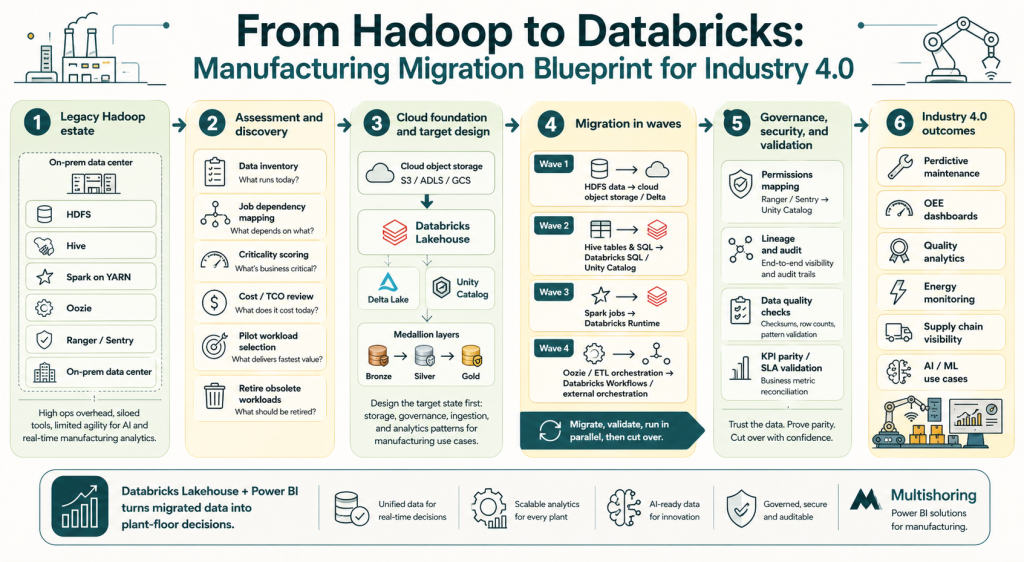
This migration blueprint shows how manufacturers can move from Hadoop complexity to a Databricks Lakehouse that supports Industry 4.0 analytics and Power BI reporting.
Hadoop to Databricks migration checklist
Use this as a working framework for planning your migration project:
- Complete HDFS storage inventory (volumes, formats, hot/cold classification)
- Catalog all active Hive tables, views, and metastore databases
- Document all scheduled workloads: Spark, Hive, MapReduce, Oozie, Sqoop
- Map workloads to business owners and outcomes
- Classify each workload: lift-and-shift, replatform, or refactor
- Define target cloud storage architecture (S3, ADLS, or GCS)
- Plan Unity Catalog structure: catalogs, schemas, table naming conventions
- Export and review Ranger/Sentry policies for Unity Catalog mapping
- Establish data validation framework (row counts, aggregates, KPI reconciliation)
- Define parallel run duration and sign-off criteria per workload
- Plan Power BI semantic model migration or greenfield build on Databricks SQL
- Set decommission timeline for each Hadoop component
Where Multishoring fits in this process
Multishoring engages with manufacturing clients across the full migration lifecycle – starting with a Hadoop migration readiness assessment that covers the workload inventory, TCO analysis, and business case development specific to manufacturing use cases.
From there, Multishoring builds a phased migration roadmap that includes not just the data engineering work, but the Power BI layer as well – whether that means migrating existing reports to connect to Databricks SQL Warehouses, or designing greenfield semantic models and dashboards built for plant-floor decision-making from day one.
That combination – Hadoop migration expertise alongside deep Power BI manufacturing experience – means clients do not end up with a modernized data platform that nobody knows how to use.
Technical Deep Dive: Migrating Core Hadoop Components
This section covers the five main technical workstreams in a Hadoop-to-Databricks migration. Each one has distinct patterns, common pitfalls, and clear best practices drawn from real enterprise migrations.
HDFS and data migration to Delta Lake
The target architecture is straightforward: move data from HDFS to cloud object storage (S3, ADLS, or GCS), then convert key analytical tables to Delta Lake format.
Migration mechanisms to consider:
- DistCp – the standard tool for bulk HDFS-to-cloud transfers, works well for initial loads
- WANdisco Live Data Migrator – enables live migration without downtime, useful for active datasets
- Cloud bulk transfer services (AWS Snowball, Azure Data Box) – for petabyte-scale migrations where network transfer is impractical
On file format conversion: Not everything needs to become a Delta table immediately. A practical rule: keep cold archive data as Parquet in object storage, but convert active analytical tables – especially those feeding Power BI reports or ML pipelines – to Delta. The performance, reliability, and time-travel benefits justify the conversion effort for any dataset your business depends on.
Data validation is non-negotiable: Before decommissioning any HDFS dataset, validate at multiple levels:
- Row counts and record completeness
- Aggregate checksums on key metrics (production volumes, sensor readings)
- Business-level KPI reconciliation between Hadoop and Databricks outputs
Hive to Databricks SQL and Unity Catalog
Hive migration has two parallel tracks: moving the data and moving the metadata.
Metastore migration: Hive databases, tables, and views map to Unity Catalog catalogs and schemas. Databricks provides sync utilities and CREATE TABLE AS SELECT patterns to automate much of this. External Hive tables require particular attention – verify location paths and access permissions before converting.
Table format conversion:
- Use
CONVERT TO DELTAfor Parquet-backed Hive tables – fastest path with no data rewrite - ORC tables require a read/write conversion cycle
- Reassess partitioning strategies during conversion – date and plant-level partitions often need restructuring for optimal Databricks query performance
HiveQL to Spark SQL: Most HiveQL translates cleanly to Spark SQL, but watch for:
- Hive-specific UDFs that need rewriting or replacement
- SerDe configurations with no direct Databricks equivalent
- ACID table behaviors that need validation against Delta Lake semantics
Several automated SQL translation tools (including those from partners like NextPathway) can accelerate this work at scale.
Spark job migration: Hadoop to Databricks Runtime
For most manufacturing data teams, Spark job migration is the largest single workload category.
Code changes to expect:
- Replace hardcoded HDFS paths (
hdfs://...) with Unity Catalog table references or cloud storage paths - Update Spark configurations – memory settings, shuffle parameters, and serialization configs tuned for static Hadoop clusters need rethinking for autoscaling Databricks clusters
- Migrate RDD-based code to DataFrames where possible – Databricks Runtime optimizes DataFrames significantly better
Modernization opportunities worth taking:
- Enable Photon for SQL and DataFrame workloads – often delivers 2-5x query speedup with no code changes
- Switch from fixed clusters to autoscaling clusters or serverless compute for job workloads
- Use Databricks Runtime’s built-in optimizations rather than manual Spark tuning
Validation approach: Run identical jobs in parallel on Hadoop and Databricks. Compare execution times, output row counts, and aggregate results. Document SLA improvements – these numbers become part of your internal business case for continued migration investment.
ETL and workflow orchestration: Oozie to Databricks Workflows
Oozie is one of the most common sources of migration complexity. XML-based workflow definitions, coordinator schedules, and multi-step dependency chains need careful mapping to modern orchestration patterns.
Two main target patterns:
| Source | Target Option A | Target Option B |
|---|---|---|
| Oozie workflows | Databricks Workflows | Apache Airflow / ADF |
| Oozie coordinators | Databricks job scheduling | External scheduler integration |
| Shell action steps | Databricks notebook tasks | Python wheel tasks |
| Sqoop imports | Databricks Auto Loader | JDBC ingestion notebooks |
Practical guidance:
- Use the migration as an opportunity to retire obsolete pipelines. Analyze Oozie execution logs – workflows that have not run successfully in 12+ months are strong decommission candidates
- Delta Live Tables is worth evaluating for pipelines with complex dependency logic – it handles data quality checks, pipeline monitoring, and dependency management declaratively
- Where existing Airflow or ADF investments exist, Databricks Workflows integrates cleanly with both rather than requiring a full orchestration replacement
Security and governance: Ranger/Sentry/Kerberos to Unity Catalog
This is the workstream that generates the most anxiety in migration planning – and the most satisfaction once complete.
The core shift: Hadoop security is distributed across Ranger policies, Kerberos principals, Sentry rules, and metastore permissions – often inconsistent and underdocumented after years of organic growth. Unity Catalog replaces all of it with a single, centralized governance layer covering data assets, ML models, and notebooks across all workspaces.
Migration steps:
- Export and audit existing Ranger/Sentry policies – many organizations discover conflicts or orphaned permissions at this stage
- Map Hadoop groups and roles to Unity Catalog principals using the UCX migration utility from Databricks
- Define Unity Catalog hierarchy: catalogs (by domain or cloud), schemas (by data layer or business unit), tables
- Migrate Hive metastore permissions using Databricks-provided sync tooling
- Validate access controls with representative users from each business group before cutover
For regulated manufacturing environments: Unity Catalog’s built-in lineage tracking and audit logs provide the documentation trail that Hadoop environments typically cannot produce cleanly. For pharma, aerospace, or automotive suppliers with traceability requirements, this is a genuine compliance upgrade – not just a technical migration.
Summary: Making the Move from Hadoop to Databricks
Hadoop served its purpose. But for manufacturers pursuing Industry 4.0 outcomes – predictive maintenance, real-time quality analytics, AI-driven supply chain visibility – it has become the bottleneck rather than the enabler. The operational burden, rising TCO, and fundamental architectural mismatch with streaming and ML workloads make the case for migration clear. The Databricks Lakehouse, built on Delta Lake and governed by Unity Catalog, replaces that complexity with a single platform that handles every workload type your data team needs – at lower cost and higher performance.
The migration itself is manageable when approached methodically. Assess your full Hadoop landscape before writing any code. Classify workloads by business value and choose the right approach – lift-and-shift, replatform, or refactor – for each one. Execute in phases, validate rigorously, and treat the governance migration to Unity Catalog as the compliance upgrade it actually is. Organizations that follow this framework avoid the big-bang risk and start delivering value from Databricks long before the last Hadoop cluster is decommissioned.
Getting the data platform right is only half the equation. Manufacturing leaders need insights, not infrastructure. Multishoring combines Hadoop-to-Databricks migration expertise with deep Power BI experience in the manufacturing industry – designing the semantic models, dashboards, and self-service analytics layer that turns a modernized lakehouse into plant-floor decision support. If your organization is ready to assess your Hadoop environment and build a migration roadmap, contact Multishoring to start the conversation.


