
Content

Power BI is widely used for self-service analytics, but ad-hoc sharing quickly leads to compliance gaps and exposed sensitive data. When executives ask why is Power BI report security important for enterprises, the answer lies in preventing these costly data exposures.
Organizations often start with simple workspaces but soon hit major roadblocks. A frequent complaint is that “everyone can see the report,” or admins waste hours troubleshooting common Power BI security mistakes RLS not working – only to realize users were mistakenly given Member or Contributor roles instead of Viewer access.
True Power BI security requires an end-to-end governance architecture, not just turning on Row-Level Security (RLS). To prevent data leaks and oversharing, organizations must implement layered protection spanning identity controls, tenant settings, workspace roles, data models (RLS/OLS), and continuous auditing.
Understanding Power BI report governance vs simple sharing is critical. Microsoft’s official security guidance explicitly recommends treating access as a complete, layered architecture. Do users see all data in a shared Power BI report? Without strict controls across Microsoft Entra ID (MFA), tenant export settings, dataset-level security, and Data Loss Prevention (DLP) policies, the answer is often a risky “yes.”
This guide is designed for BI leads, admins, and product owners responsible for secure data sharing across finance, HR, and multi-tenant SaaS environments. Multishoring is an expert in building custom reports in Power BI, and we regularly design and implement reporting solutions with hardened security models for mid-size and enterprise clients.
Understanding the Power BI Security Stack: From Tenant to Row Level
Securing a Power BI environment requires a multi-layered approach. Security does not start inside the report itself – it begins at the network and identity level. A true security architecture spans from tenant-wide settings down to individual data rows.
To meet compliance requirements and protect your intellectual property, you need a mental model that treats security as an end-to-end stack. Here is how that stack breaks down.
Identity, Authentication, and Basic Access Control
Before a user even sees a dashboard, they must pass through your first line of defense. Power BI relies entirely on Microsoft Entra ID (formerly Azure AD) to handle authentication, Single Sign-On (SSO), and conditional access.
When searching for Power BI authentication security best practices, the top recommendation from Microsoft and security experts is always the same: enforce strict identity controls. Using Power BI MFA and conditional access for reports is a mandatory baseline for enterprise deployments.
Instead of just requiring a password, conditional access policies allow you to restrict access based on:
- User location: Blocking login attempts from outside approved countries or corporate IP ranges.
- Device compliance: Ensuring users only access reports from managed, secure company devices.
- Risk levels: Forcing password resets or blocking access if Entra ID detects suspicious login behavior.
At Multishoring, we see the same misconfigurations. Companies spend weeks building complex data models but leave their front door wide open by failing to enforce MFA for their report viewers.
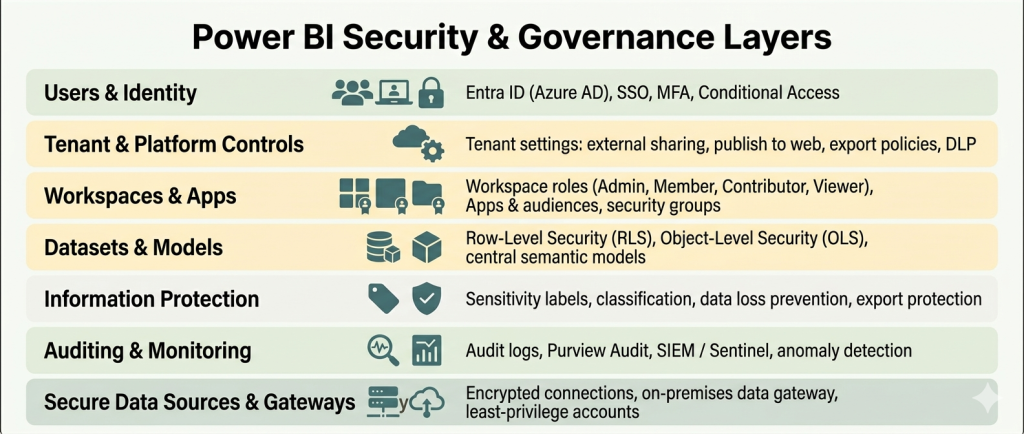
The Power BI Security Layers Explained
Understanding the Power BI security architecture layers explained by Microsoft’s official security whitepaper is the key to passing security audits. Treating these layers as a unified system is exactly how you meet strict compliance standards like GDPR, HIPAA, and ISO certifications.
Here is the concise mental model for your security stack:
- Tenant-level settings: This is your overarching governance layer. It dictates global rules like who can export data, who can publish to the web, and whether external sharing is allowed.
- Workspace & app permissions: This layer controls who can edit vs. who can simply view. Understanding the difference between workspace access and row level security in Power BI is crucial. Workspace roles (Admin, Member, Contributor, Viewer) grant access to the container. Row-level security only filters the data inside it.
- Dataset/model security: This is where you apply Row-Level Security (RLS) to restrict rows of data, and Object-Level Security (OLS) to hide specific columns or tables.
- Protection and monitoring: This final layer involves applying sensitivity labels, Data Loss Prevention (DLP) policies, and integrating audit logs with a SIEM tool like Microsoft Sentinel to track user activity.
Many business leaders confuse these layers. They frequently search for Power BI tenant settings vs report security to understand where to place restrictions. The rule of thumb is simple: use tenant settings to block risky behaviors globally, and use report security to control who sees specific data points.
Encryption, Compliance, and Data Residency
A common question from IT and legal teams is: is Power BI data encrypted at rest and in transit? The answer is yes.
Power BI encrypts data at rest using AES-256 encryption. Data in transit is protected using TLS/HTTPS protocols. The entire platform is hosted on Microsoft’s certified cloud infrastructure, which means it inherits major compliance certifications. If your legal team asks about Power BI compliance GDPR HIPAA ISO 27001 or SOC 2, Microsoft provides comprehensive audit reports to verify these standards.
However, cloud compliance is a shared responsibility. We recommend this short checklist before deploying sensitive reports:
- Where is your tenant hosted? Confirm your data region aligns with your local data residency laws.
- What regulatory regimes apply? Identify if your data falls under HIPAA, GDPR, or financial regulations.
- Have you involved compliance teams? Bring legal and compliance stakeholders into the architectural planning phase early, not after the reports are already shared.
Is your Power BI environment truly secure?
Don’t leave sensitive business data exposed. Our experts will audit your tenant settings, workspace roles, and RLS configurations.
Let me guide you through our Power BI security audit process.

Let me guide you through our Power BI security audit process.
Designing Report-Level Security: RLS, OLS, Workspaces, and Apps
Keep workspace editing roles strictly for your BI team and distribute reports to end-users exclusively through Power BI Apps. Blurring the lines between content creators and report consumers is the number one reason data security rules fail to apply.
Workspace Roles vs App Permissions: Where People Go Wrong
Power BI uses four main workspace roles: Admin, Member, Contributor, and Viewer. The critical nuance here is that Row-Level Security (RLS) is only enforced for users with Viewer access.
If you grant someone Admin, Member, or Contributor rights, they completely bypass RLS. This one rule answers the frantic search for why can everyone see my Power BI report even with RLS. When IT leaders experience Power BI workspace role confusion RLS not working, over-privileged workspace roles are almost always the root cause.
Here is how you should structure permissions to ensure security rules apply correctly:
| User Type | Recommended Access Method | Assigned Role | Is RLS Enforced? |
|---|---|---|---|
| BI Team / Developers | Direct Workspace Access | Admin, Member, Contributor | No (Sees all data) |
| End Users / Executives | Power BI App | App Consumer (Viewer) | Yes (Filtered data) |
To avoid issues with Power BI app vs workspace permissions security, follow Microsoft’s consumer planning guidelines:
- Keep the number of Admins and Members small and concentrated in IT.
- Give most consumers access via Apps.
- Use app “audiences” to show different subsets of reports to different departments without creating multiple workspaces.
Implementing Row-Level Security (RLS) Properly
Row-Level Security restricts data access at the row level. You define these roles with DAX filters in Power BI Desktop, then assign users or groups to those roles in the Power BI Service.
For enterprise scale, avoid manual, static role assignments. Instead, look for a power bi row level security tutorial dynamic example. Dynamic RLS relies on dimension tables (e.g., a “dim_user” table) connected to your fact tables to automatically map users to their assigned departments or regions. This is the recommended pattern for power bi user based security filter data by logged in user.
At Multishoring, we see the same misconfigurations repeatedly when companies try to scale this feature. If you are dealing with power bi rls not working after publish, check these common pitfalls:
- Workspace overrides: Users were accidentally given Contributor access.
- Filter conflicts: Users are assigned to multiple roles that clash. You must establish strict power bi rls multiple roles best practices to handle overlap predictably.
- Login mismatches: The Username() or UserPrincipalName() DAX functions do not match the user’s actual Entra ID email format.
Object-Level Security (OLS) and Sensitive Attributes
While RLS filters rows, Object-Level Security (OLS) hides specific tables and columns entirely. It even hides the metadata, preventing users from knowing that sensitive fields (like salary or PII) exist in the dataset.
When evaluating object level security power bi vs row level security, remember they are complementary. Use RLS to filter which sales a manager sees, and use OLS to hide sensitive columns with power bi ols so they cannot see the profit margin column at all.
A word of caution: Overly aggressive OLS can break report visuals if a user lacks access to a required column. Because of this, OLS requires thorough testing with business users and belongs in a governed, central semantic model.
Sharing Securely: Internal, External, and Embedded
Sharing a link is simple, but secure distribution requires deliberate architecture. Here is how to handle the three main sharing scenarios:
1. Internal Secure Sharing
- Best practice: Use Power BI Apps and Entra ID security groups. This is the answer to how to share Power BI reports securely internally.
- What to avoid: Do not use broad “share with entire organization” links unless the data is explicitly protected by RLS as a secondary layer.
- Tenant control: Turn off “Publish to web” in your tenant settings. This creates a public, anonymous link and should be heavily restricted.
2. External Users (B2B)
- Authentication: When figuring out how to secure Power BI reports for external users, rely on Entra ID B2B guest users. They authenticate securely through their own organization.
- Tenant settings: Your Power BI admin must explicitly allow external sharing in the tenant settings.
- Never publish anonymously: Secure sharing for external users should always use B2B or secure embed, never public links.
3. Embedded & Multi-Tenant SaaS
- Architecture choices: If you are building a SaaS product and need Power BI secure embedded analytics multi tenant, Microsoft offers two main paths: workspace isolation per tenant, or a shared model using dynamic RLS keyed to the tenant ID.
- Security basics: Secure token handling, HTTPS protocols, and an updated Power BI report server security configuration (if using on-premises gateways) are core requirements.
Our Data Consulting & BI Services You Might Find Interesting

Power BI Consulting
We provide the strategic guidance and specialized knowledge needed to transform your data challenges.

Data Analytics & Strategy Consulting
We build practical data strategies that help you increase revenue, cut operational waste, and get ready for AI.

Power BI Report Development
We transform messy spreadsheets into fast, automated Power BI reports. Get real-time, actionable business insights.
Governance and Tenant-Level Controls for Power BI Security
Perfect report-level security is useless if users can easily export your data to Excel and email it externally. To truly secure your platform, you must configure strict tenant-level controls, apply persistent sensitivity labels, and continuously monitor audit logs.
Fabric and Power BI administrators manage global tenant settings that override individual workspace permissions. Because these settings strongly influence user behavior, they are your most effective defense against data leakage. At Multishoring, we regularly help clients move away from ad-hoc setups by implementing a structured Power BI governance framework for report access.
Here is a breakdown of the critical governance areas, the risks involved, and the controls you must implement:
| Security Area | Common Risks & Challenges | Best Practices & Governance Controls |
|---|---|---|
| Tenant Settings & Data Export | Unrestricted external sharing, anonymous web publishing, and mass data downloads bypassing RLS. | Conduct a baseline audit using a Power BI tenant security assessment checklist. To answer how to stop users exporting data from Power BI, disable “Export to Excel” globally and allow it only for specific Entra ID security groups. Follow Power BI block export data best practices by restricting .pbix downloads. Adhere to Power BI tenant settings security best practices by strictly disabling “Publish to web.” |
| Information Protection & DLP | Sensitive financial or HR data leaving the organization via approved exports. | When executives ask how to secure sensitive financial data in Power BI, the answer is Microsoft Purview. Secure Power BI reports with sensitivity labels (e.g., Highly Confidential). These labels inherit from datasets to reports and persist even if exported to PDF/Excel. Implement centralized rules using Power BI DLP policy setup examples in Microsoft 365 to detect or block risky sharing of labeled data. |
| Auditing & Workspace Hygiene | “Shadow BI,” overuse of personal workspaces, and lack of visibility into data breaches. | For teams needing to know how to monitor Power BI access and track report usage, enable Microsoft Purview Audit immediately. Adopt Power BI audit logs best practices for enterprises: export these logs to secure storage or a SIEM (like Microsoft Sentinel) for long-term anomaly detection. Rely on Power BI audit logs for security and compliance to catch dangerous habits, like org-wide sharing links or using “My Workspace” for production data. |
| On-Premises Data Gateways | Compromised internal databases that are bridged to cloud reporting environments. | If you are researching how to secure Power BI on premises data gateway connections, treat them as critical infrastructure. Apply core Power BI gateway security best practices: install gateways only on hardened servers, utilize least-privilege service accounts, restrict admin access, keep the software updated, and actively monitor gateway logs. |
Implementing these global controls should not happen overnight.
We recommend treating this as a 30-day adoption roadmap. Start with an audit of your current tenant configuration, define your targeted roles and workspace strategy, and then roll out these security changes in phases to avoid disrupting business operations.
From Theory to Practice: A Power BI Security & Governance Framework
Moving from a chaotic reporting environment to a secure architecture requires a structured rollout. By following a four-phase framework—assess, design, implement, and monitor – you can lock down your data without bringing business analytics to a halt.
This step-by-step framework brings all the security layers together. It is inspired by Microsoft’s adoption roadmaps and the consulting frameworks we use daily with our enterprise clients.
Phase 1: Assess Your Current State
Before making changes, you must understand your exposure. You cannot secure assets you do not know exist.
- Inventory your assets: Map out all tenants, workspaces, apps, and key datasets. Identify exactly where your sensitive domains live (e.g., finance, HR, customer data).
- Run a baseline audit: Build a Power BI report security checklist to review your current tenant settings, workspace roles, export options, and external sharing usage.
- Analyze user behavior: Use your Microsoft Purview logs to figure out how to audit who viewed a Power BI report. Look for problematic patterns like over-sharing, organization-wide links, or using personal workspaces for production data.
Phase 2: Design a Target Security Model
Once you know your vulnerabilities, design a model that restricts access by default. Building a Power BI governance framework for report access starts with your users.
- Define personas: Group users into internal roles (e.g., finance analyst, HR manager), external partners, and admin personas.
- Map access patterns: Decide which workspaces and apps each persona should use. Determine if access should be controlled by dynamic Row-Level Security (RLS) inside a single dataset, or if you need separate workspaces entirely.
- Codify governance policies: Write clear rules on who is allowed to create workspaces, how certified datasets are reviewed, and when external sharing is permitted.
Phase 3: Implement Controls and Protections
This is where you execute the technical changes across your architecture. Following Power BI security best practices for enterprises means applying controls at every layer:
- Harden the foundation: Lock down tenant settings, restructure workspace roles, and configure dynamic RLS. For highly sensitive fields—like those found when implementing Power BI report security for healthcare data—configure Object-Level Security (OLS).
- Apply data protection: Roll out default and mandatory sensitivity labels for key domains. Align these with your DLP policies to prevent data leakage.
- Secure external boundaries: Update your gateway configurations and apply strict external sharing rules, particularly if you need Power BI security for multi tenant environments.
Phase 4: Monitor, Educate, and Iterate
Security is not a one-time project. It requires ongoing maintenance and user education to prevent regressions.
- Establish regular reviews: Schedule monthly reviews of audit logs, tenant settings, and workspace inventories.
- Educate report creators: Teach your internal teams how to use RLS, workspace roles, and sensitivity labels correctly. Educating users is the best way to prevent “shadow BI” patterns that bypass governance.
- Evaluate your setup: If you lack the internal resources to manage this, you might need a formal Power BI security review service. Many organizations look into Power BI governance implementation cost or seek out Power BI security assessment consulting to ensure their environment meets regulatory standards.
Summary: Turning Power BI into a Secure, Governed Analytics Platform
Securing a single report is never enough. To protect your organization’s most sensitive data, you need a comprehensive governance strategy covering who can create content, how it gets shared, and how user activity is monitored.
The most effective Power BI report security and governance best practices always return to the layered model:
- Identity & Tenant: Microsoft Entra ID and global tenant settings.
- Workspaces & Apps: Strict role assignments separating creators from viewers.
- Datasets (RLS/OLS): Row and object-level filtering based on user identity.
- Information Protection: Sensitivity labels and DLP policies preventing export leaks.
- Auditing: Continuous monitoring of user activity.
If you are wondering how to build a secure Power BI governance framework, you do not have to do it alone.
Multishoring helps organizations move from ad-hoc Power BI deployments to governed, secure analytics platforms. Whether you need an audit of your current setup or are looking for a Power BI tenant security assessment and implementation partner to design a framework tailored to your finance, healthcare, or SaaS organization, Multishoring can support you from assessment to full implementation.


