
Content

IT budgets are tight and API traffic keeps climbing, so the first question most leaders ask about Azure API Management is simple: what will it cost, and how do we stop the bill from running away? The honest answer is that APIM can be cheap or expensive depending on one choice – the pricing tier – and on how you run it day to day. This guide breaks down how APIM is priced, what actually drives your bill, and the levers that keep it under control.
Azure API Management (APIM) puts every API behind one managed gateway, which is where the cost story begins. Instead of running and patching separate gateways, you pay for a single platform – but the total depends heavily on the tier you choose and how you configure it. This guide covers what APIM costs, what drives the bill, and how to right-size it so you are not overpaying for capacity you never use.
Done right, the move pays off. Companies that consolidate scattered API gateways onto Azure API Management often report 30-40% reductions in their API-related infrastructure costs. The savings come less from “moving to the cloud” and more from changing how APIs are run:
- Replacing scattered API gateways with one managed platform
- Cutting manual lifecycle work through automation
- Building security into the gateway instead of buying it separately
- Paying for the capacity you use rather than peak capacity you rarely hit
How Azure API Management Is Priced
APIM does not have one price – it has a set of tiers, and the tier you pick is the single biggest factor in your bill. Choose the wrong one and you either overpay for features you never touch or hit limits that force an expensive upgrade. Here is the shape of it.
- Consumption – serverless and billed per API call, with no fixed monthly fee. It scales to zero when idle, which makes it the cheapest option for variable or low-volume workloads.
- Developer – inexpensive, but it carries no SLA. It is for building and testing, not production traffic.
- Basic, Standard, Premium – dedicated capacity billed per unit at a fixed monthly rate. Features and throughput step up as you go, with Premium adding multi-region deployment, virtual network integration, and the self-hosted gateway.
- v2 tiers (Basic v2, Standard v2, Premium v2) – a newer generation with faster provisioning and updated networking, worth checking before you default to the classic tiers.
Because Microsoft updates prices and unit limits regularly, treat the live Azure API Management pricing page as the source of truth, and read Plan and manage costs for API Management before you commit to a tier. The practical rule: start from your real call volume, your need for an SLA, and whether you need multi-region or VNet, then pick the lowest tier that covers those. Most overspending traces back to a Premium instance doing a Standard job. It adds up fast: in one Azure cost-governance project, right-sizing an over-provisioned estate cut the client’s Azure bill by 35%, around 1.4 million euros a year, without removing a single report.
Looking to Optimize Your Azure API Costs?
Our team specializes in Azure API Management cost optimization – we analyze your current API setup, right-size your tier, and put the scaling, caching, and governance in place to cut operational spend without losing capability.
Let us show you how to tighten your API infrastructure while cutting costs.

Let us show you how to tighten your API infrastructure while cutting costs.
What Actually Drives Your APIM Bill
Once a tier is chosen, a handful of factors decide what you actually pay each month. Knowing them upfront is what separates a predictable bill from a nasty surprise:
- The tier and the number of units you run. On dedicated tiers you pay per unit whether or not the traffic justifies it.
- Call volume on Consumption, where every API call is billed, so a chatty client or a retry loop shows up directly on the invoice.
- Multi-region deployment and extra gateways, which multiply the unit cost for each region you add.
- Self-hosted gateways, billed per gateway on Premium, which are easy to leave running after a project ends.
- Backend load, because every call APIM passes through hits a backend you also pay to run. Fewer calls reaching the backend means a smaller bill on both sides.
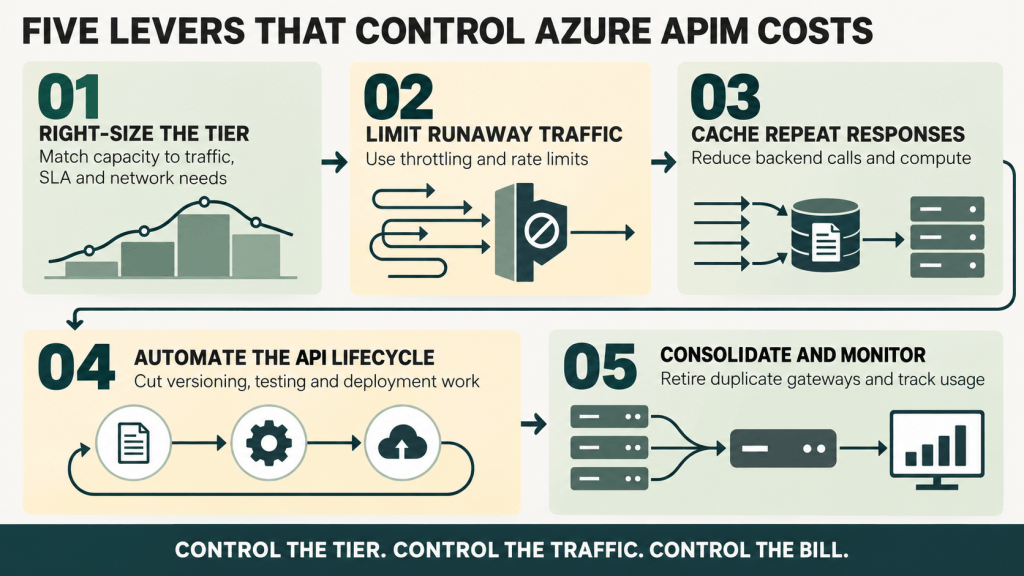
How to Keep Your APIM Costs Under Control
Most API management platforms promise savings. The difference with Azure API Management is in the specific controls you can turn on, each tied directly to the cost drivers above.
Throttling and Rate Limiting
This is the control that most often gets skipped, and it maps straight to the bill. Without limits, a single misbehaving client can run up both your call charges and your backend costs. APIM lets you cap usage to prevent spikes from:
- Runaway applications consuming far more than they should
- Denial-of-service attempts
- Unauthorized high-volume calls
- Development mistakes such as an accidental infinite loop
Caching
Caching in APIM is not only about speed. Every cached response is one fewer call to your backend, which is where a lot of the real spend sits. One enterprise client cut their backend processing costs by 60% through caching alone. The platform lets you:
- Cache full API responses
- Store partial results
- Set up distributed caching across regions
- Tune caching rules to the data and the use case
Automated API Lifecycle Management
This is where the operational savings come from. Instead of developers handling versioning, testing, and deployment by hand, APIM automates them. Teams commonly cut API maintenance time by around 70% with these features, which covers:
- API version management
- Testing and validation
- Documentation updates
- Deployment across environments
- Usage monitoring and analytics
Right-Sizing and Consolidation
Many organizations do not realize how many gateways they run until they audit. Azure API Management can replace legacy on-premise gateways, department-specific API solutions, standalone API security tools, and separate monitoring systems – collapsing several line items into one. Pair that with the right tier and unit count, and you stop paying for peak capacity you touch a few hours a week. We saw the payoff at TIM SA, where a single integration layer replaced scattered point-to-point connections across three core systems with 25 managed web services – one platform to run and monitor instead of many.
On-Premise vs. Cloud API Management: Cost Implications
Across the migrations we have run, the gap between on-premise and cloud API management is wide once you count the hidden costs – hardware, staff, security tooling, disaster recovery. It plays out in real projects: when we moved Tikkurila’s integration platform from BizTalk to Azure Logic Apps, their IT costs dropped by 50%. The table below lays out a representative comparison.
| Cost Category | On-Premise API Management | Azure API Management |
|---|---|---|
| Initial Setup | $50,000 – $200,000 hardware costs + implementation | No upfront hardware costs, ~$5,000 implementation |
| Annual Infrastructure | $30,000 – $50,000 (hardware maintenance, power, cooling) | Included in subscription |
| Staff Requirements | 2-3 full-time employees ($200,000 – $300,000/year) | 0.5-1 FTE ($50,000 – $100,000/year) |
| Security & Compliance | $40,000 – $60,000/year (tools, audits, updates) | Built into platform cost |
| Scaling Costs | Additional hardware purchase + setup time | Automatic, pay-as-you-go |
| Disaster Recovery | Secondary site: $50,000 – $150,000 | Included in subscription |
| Updates & Patches | $20,000 – $30,000/year in staff time | Automatic, no additional cost |
| Total First Year | $340,000 – $790,000 | $60,000 – $150,000 |
| Annual Running Cost | $290,000 – $440,000 | $55,000 – $145,000 |
On these numbers, Azure API Management typically delivers 50-70% cost savings over a traditional on-premise setup. The drop in hardware and staffing usually justifies the move on its own, before you count the operational gains. The one caveat: the cloud bill is only this low if you right-size the tier. An over-provisioned Premium instance can erase the advantage.
Security and Compliance: Cost You Avoid by Preventing Breaches
API security rarely shows up in a cost model until there is an incident. Industry estimates put the average cost of a serious API security incident at well over $1.8 million, before the reputational damage. APIM reduces that exposure by building protection into the gateway instead of leaving it to separate tools and staff.
Built-in Policy Enforcement
Traditional API security usually means buying and maintaining several products. APIM includes OAuth and JWT validation, IP filtering, rate limiting, request and response validation, and DDoS protection as standard – no extra licenses, no added infrastructure.
Compliance Without the Overhead
Compliance work burns through IT budgets. Azure API Management already meets GDPR, HIPAA, SOC 1 and SOC 2, ISO 27001, and PCI DSS requirements. One healthcare client saved over $200,000 a year by retiring separate compliance tools and cutting audit preparation time by 60%.
Automated Security Updates
Patching on-premise gateways means downtime and staff time. With APIM, Microsoft handles updates. One financial services company calculated it saved 120 staff hours a month on security maintenance alone.
Role-Based Access Control
Rather than managing permissions across several platforms, APIM centralizes access control. That means fewer mistakes, less admin overhead, quick revocation, and clean audit trails. Across these controls, organizations on APIM commonly see fewer security incidents, less time spent on security administration, and lower spend on standalone security tools.
Scalability and Performance: Reducing IT Overhead
Scaling is where a lot of API budgets quietly leak. Azure API Management changes the economics of it, and the comparison below shows where.
| Feature | Traditional Approach Cost | Azure APIM Solution | Typical Savings |
|---|---|---|---|
| Global Distribution | $100K+ per region setup | Pay-as-you-go, no setup costs | 70-80% |
| Auto-scaling | Manual capacity planning + buffer (40% waste) | Automatic, usage-based | 30-45% |
| Load Balancing | Dedicated hardware + licenses ($50K+) | Built-in, no extra cost | 100% |
| Performance Optimization | Multiple tools ($30K+ annually) | Included in platform | 90% |
| Global CDN | Separate CDN contracts ($20K+) | Integrated, usage-based | 60% |
That is the pattern worth holding onto: a right-sized Azure platform usually means paying less for better performance, not trading one against the other.
Other Azure Services

Microsoft Azure Consulting
Our team is here to be your reliable partner, ensuring a hassle-free transition to Azure excellence.

Azure Logic Apps Integration
Our experts can speed up Azure Logic Apps integration projects and ensure seamless data connectivity across systems.

Azure Service Bus Integration
Find out how our expertise can help you leverage this potent tool for efficient integration in your integration projects.
Best Practices for Maximizing Cost Savings with Azure API Management
Across the APIM cost optimizations we have run, the same few moves deliver most of the savings. These are the ones that consistently hold up in practice.
-
Choosing the Right Pricing Tier
Most companies overspend by picking a tier without analyzing real usage. One client saved $8,000 a month simply by moving from Premium to Standard once we checked their actual numbers. Look past the feature list and size the tier to your real call volume, peak patterns, and geographic needs.
-
Strategic Caching
Caching is the most overlooked cost lever in APIM. We helped a financial services provider cut backend costs by 70% with it. The trick is matching cache durations to how the data actually changes, using regional caching for global apps, and warming the cache for critical APIs so the backend is hit less often.
-
Monitoring and Analysis
APIM monitoring regularly surfaces waste that teams did not know about. One client found they were spending $5,000 a month on unnecessary API calls. Reviewing usage patterns, cost by department, and performance metrics turns monitoring from passive tracking into a way to find real savings.
-
Automation
Manual API management is an avoidable drain. Wiring APIM into CI/CD pipelines and automating policy management cuts operational cost and improves reliability at the same time. One team cut their API management time by 70% through automation.
-
Instance Right-Sizing
The biggest lesson is to right-size instances. Through consolidation and proper capacity planning, we helped one enterprise go from 12 instances to 4, saving over $100,000 a year. It is not about running fewer instances for its own sake – it is about running the right number for the actual load.
Conclusion: Azure API Management as a Cost Decision
Azure API Management is a strong cost play, but only when it is set up deliberately. In our work across sectors, organizations typically see a 40-60% reduction in total API management costs within the first year – when they match the tier to real usage and turn on the controls above. Left on autopilot, a Premium instance and unbounded calls can just as easily move the number the wrong way.
The longer-term impact goes beyond the monthly bill. Teams on Azure API Management report fewer security incidents, faster time-to-market for new APIs, and lower maintenance costs. One enterprise we worked with removed over $300,000 in annual API-management expense while improving service quality and expanding its API offering – without adding headcount or loosening its security and compliance posture.
Moving to Azure API Management is as much a financial decision as a technical one. If you want to cut IT costs while keeping or improving your API capabilities, APIM gives you a clear path – provided the tier and configuration fit your real workload. Contact us for a cost analysis of your current setup.
Frequently Asked Questions
How much does Azure API Management cost?
It depends entirely on the tier. Consumption has no fixed fee and bills per API call, so a low-volume API can cost very little. Dedicated tiers (Basic, Standard, Premium, and the v2 tiers) charge a fixed monthly rate per unit that rises with throughput and features. Check the Azure API Management pricing page for current rates.
What are the Azure API Management pricing tiers?
Consumption (serverless, pay-per-call), Developer (no SLA, for dev and test), and the production tiers Basic, Standard, and Premium, which bill per unit with increasing features. Microsoft also offers newer v2 tiers (Basic v2, Standard v2, Premium v2) with faster provisioning and updated networking.
Why is my Azure API Management bill so high?
Usually one of a few reasons: a dedicated tier running more units than the traffic needs, a Premium instance used where Standard would do, multiple regions or self-hosted gateways left running, or high call volume with no caching or rate limiting. Auditing the tier and turning on caching and throttling is the fastest way to bring it down.
Is there a free option for Azure API Management?
There is no production free tier, but the Consumption tier includes a monthly allowance of calls and scales to zero when idle, which keeps costs minimal for small or intermittent workloads. The Developer tier is low-cost for building and testing, but it carries no SLA and should not run production traffic.
How do I reduce Azure API Management costs?
Right-size the tier to real usage, cache responses to cut backend calls, apply rate limiting to stop runaway traffic, consolidate duplicate gateways, and monitor usage by team to catch waste. Together these target the main drivers of the bill rather than trimming around the edges.


