
Content

Migrating from SSIS to Azure Data Factory (ADF) is the most practical step an enterprise can take to reduce on-premises data infrastructure costs while unlocking cloud-native analytics. You do not have to rebuild your entire data platform overnight. ADF allows you to run existing SSIS workloads natively in the cloud while giving you the tools to build scalable, modern data pipelines.
SQL Server Integration Services (SSIS) has been a reliable workhorse for batch data warehousing and operational ETL since the mid-2000s. It offers tight SQL Server integration, rich transformations, and a highly mature ecosystem. However, IT and business leaders now face new pressures that make strictly on-premises SSIS difficult to justify and scale.
The primary drivers pushing organizations to modernize include:
- Cloud gravity: Applications and core data are rapidly moving to cloud environments like Azure SQL Database, SQL Managed Instance, and various SaaS platforms.
- Complex data needs: Modern analytics require the seamless integration of structured, semi-structured (JSON, Parquet), and unstructured data to feed platforms like Power BI and Microsoft Fabric.
- Infrastructure overhead: Traditional SSIS relies on heavy infrastructure. Maintaining it means dealing with continuous OS patching, expensive SQL licensing, and hardware capacity planning.
Enter Azure Data Factory. It is Microsoft’s fully managed, cloud-native data integration service featuring over 90 built-in connectors. ADF is not just a simple replacement for SSIS – it is a broader orchestration platform that extends your current capabilities.
If you plan to migrate SSIS to ADF, Microsoft explicitly supports this transition. You can use the Azure-SSIS Integration Runtime (IR) to execute your existing packages with minimal code changes. Alternatively, you can use native ADF pipelines to tap into serverless scaling.
Choosing the right SSIS to ADF migration strategy requires technical foresight. As a Microsoft-aligned specialist partner, Multishoring brings deep, hands-on experience in Azure Data Factory, Power BI, and hybrid architectures. We help enterprises move beyond basic lift-and-shift operations to design practical migration roadmaps that align with long-term business goals.
Planning an SSIS to Azure Data Factory migration?
We provide deep Microsoft Azure expertise and flexible access to top data engineers to help you assess, design, and seamlessly migrate your legacy ETL pipelines.
Let me be your single point of contact and guide you through your data modernization journey.

Let me be your single point of contact and guide you through your data modernization journey.
From SSIS to Azure Data Factory: What Changes (and What Doesn’t)
Understanding the difference between SSIS and Azure Data Factory is critical before starting any migration. ADF is not a one-to-one replacement or simply “SSIS in the cloud.” It is a comprehensive orchestration service that manages data movement across diverse environments, while SSIS operates primarily as an execution engine.
When you migrate SSIS to ADF, you fundamentally shift how your organization handles infrastructure, connectivity, and development.
Core Architecture and Compute Models
Traditional SSIS relies on fixed on-premises infrastructure. You deploy packages on Windows servers or SQL Server instances. Scaling up requires provisioning more hardware or VMs. Your IT team remains responsible for OS patching, SQL upgrades, hardware capacity planning, and maintaining the SSIS Catalog.
Azure Data Factory operates as a managed PaaS (Platform as a Service). Microsoft handles the underlying infrastructure and software updates. Instead of fixed servers, you provision Integration Runtimes to execute your pipelines. This enables elastic scaling of compute resources – both for native ADF pipelines and your existing SSIS packages – so you only pay for compute when pipelines are actively running.
SSIS vs Azure Data Factory: Feature Comparison
Here is a clear breakdown of how the two platforms compare across key operational areas.
| Feature Area | On-Premises SSIS | Azure Data Factory (ADF) |
|---|---|---|
| Primary Role | Procedural ETL engine tightly integrated with SQL Server. | Cloud-native orchestration and data integration service. |
| Connectivity | Strong for relational databases and files. Needs custom drivers for SaaS. | 90+ native connectors for SaaS, NoSQL, REST APIs, and Azure services. |
| Data Types | Optimized for structured, row-by-row data. | Built for semi-structured data (JSON, Parquet) and data lake patterns. |
| DevOps & Versioning | Visual Studio-centric. Version control via Git/TFS, but not cloud-first. | Browser-based UI. Native CI/CD integration with Azure DevOps and GitHub. |
| Cost & Licensing | High fixed costs. Tied to SQL Server licensing and dedicated hardware. | Pay-as-you-go model. Billed by activity runs, volume, and compute hours. |
When to Keep SSIS and When to Choose ADF
Even with a strong push toward the cloud, you do not have to abandon all legacy processes. Understanding when to use SSIS vs Azure Data Factory is key to a smart modernization strategy.
When SSIS still makes sense:
- Strict regulatory or compliance constraints require data to remain entirely on-premises.
- You have extreme low-latency requirements for an on-premises database.
- Your packages rely heavily on complex, custom-coded third-party components that are expensive to rebuild.
- You operate in Azure Government or restricted regions where specific ADF features may lag.
When Azure Data Factory is the better fit:
- The majority of your operational systems are already in Azure or actively moving there.
- You need to integrate cloud-native analytics tools like Microsoft Fabric, Synapse, and Data Lake.
- You want to eliminate hardware maintenance and switch to a flexible, consumption-based pricing model.
- You require a managed, scalable service to handle highly varied structured and unstructured data sources.
Modernization Options: Lift-and-Shift, Re-Platforming, or Hybrid
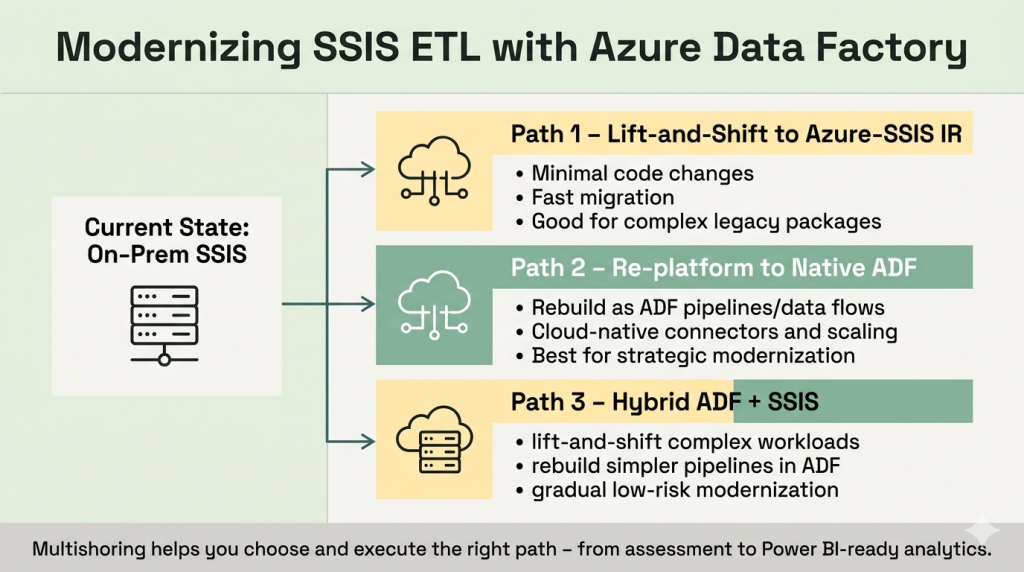
The most effective SSIS to Azure Data Factory migration options depend entirely on your timeline, existing technical debt, and long-term data goals. Most enterprises do not rewrite everything at once. Instead, they choose between a fast lift-and-shift, a complete native re-platforming, or a practical hybrid approach.
Evaluating your current packages against these three paths is the first step in building a roadmap. As an integration partner, Multishoring typically recommends a portfolio-based assessment to categorize your existing packages into candidates that you should lift-and-shift, refactor, or simply retire.
Option 1: Lift-and-Shift SSIS to Azure-SSIS IR
This “as-is” migration path involves provisioning an Azure-SSIS Integration Runtime (a managed cluster of VMs running SSIS) within ADF. You deploy your existing SSIS packages to an SSISDB hosted on Azure SQL Database or SQL Managed Instance, and execute them using the “Execute SSIS Package” activity in ADF.
When to choose this path:
- You have a massive SSIS estate and a tight deadline to exit an on-premises data center.
- Your packages contain highly complex control flows or custom third-party components that are difficult to rewrite.
- You want a fast migration that utilizes your team’s existing SSIS skills before attempting a broader re-architecture.
Pros and Cons:
To lift and shift SSIS to Azure SSIS requires minimal code changes and provides the fastest route to the cloud. However, this method carries forward your existing technical debt and design constraints. You still pay for dedicated SSIS runtime compute, meaning you are not taking full advantage of cloud-native elasticity.
Option 2: Re-Platform SSIS Packages to ADF Pipelines
Re-platforming means stepping away from traditional SSIS architecture entirely. You rebuild your core ETL processes as native ADF pipelines and mapping data flows. Instead of relying on on-premises drivers, you use ADF’s native cloud connectors and serverless compute scaling.
When to choose this path:
- Your packages are of simple to medium complexity (e.g., basic copy tasks, filters, joins, and lookups).
- Your target architecture is moving away from a classic data warehouse toward a modern data lakehouse or Microsoft Fabric.
- You want to completely eliminate your dependency on SSIS technology over the long term.
Pros and Cons:
When you replatform SSIS packages to ADF pipelines, you gain better alignment with modern architectures and tap into serverless scaling. The main drawback is the higher initial effort. Rebuilding requires careful mapping of SSIS transformations to ADF activities, which demands more upfront time and budget.
Option 3: Hybrid ETL Architecture (SSIS and ADF)
A hybrid approach allows SSIS and ADF to co-exist. You lift-and-shift your most complex, legacy packages to the Azure-SSIS IR, while rewriting your simpler or highly strategic pipelines natively in ADF. You then use ADF as the master orchestrator to run everything and integrate with downstream analytics like Synapse or Power BI.
When to choose this path:
- You have a mix of legacy systems that demand row-by-row logic alongside new cloud data sources.
- You want a low-risk modernization path that balances immediate cloud benefits with gradual refactoring.
- Your team is still figuring out when to use Azure SSIS integration runtime vs ADF for specific workloads.
Pros and Cons:
Building a hybrid ETL architecture with SSIS and ADF is widely considered best practice by Microsoft and specialized partners. It bridges the gap between on-premises legacy systems and cloud-native analytics. The only downside is that your team must support two different integration models simultaneously during the transition phase.
Our Data Consulting Services You Might Find Interesting

Azure Data Factory Consulting
Design, build, and optimize scalable, cloud-native data integration pipelines with our expert Azure Data Factory consulting services.

Data and Analytics Modernization Services
Seamlessly migrate and transform your legacy data infrastructure into agile, cloud-based platforms that power modern business intelligence.

Data Analytics & Strategy Consulting
Turn complex enterprise data into a competitive advantage by developing a clear, actionable, and future-proof analytics roadmap.
SSIS to ADF Migration Blueprint: Phases, Tools, and Best Practices
Migrating without a clear plan leads to broken dependencies and cost overruns. This blueprint condenses Microsoft’s official guidance into four actionable phases: assessment, design, execution, and optimization.
Phase 1 – Assessment: Understand Your SSIS Estate
Evaluate your SSIS estate before moving a single workload. If you want to know how to analyze SSIS packages before migration, start with the Data Migration Assistant (DMA) for SSIS. This tool automates your SSIS to ADF migration assessment and flags critical compatibility issues.
- Inventory and classify: Document all packages, dependencies, and schedules. Group them by migration path (lift-and-shift, refactor, or retire).
- Analyze rules: Use DMA to catch deprecated components, hardcoded host names, and legacy connection strings.
- Network readiness: Map out on-premises sources, VPN/ExpressRoute requirements, and Integration Runtime placement.
Phase 2 – Design and Planning
Define your target architecture early. Decide exactly where Azure-SSIS IR fits versus native ADF pipelines, and prioritize Azure Managed Identity over key-based authentication.
- Portfolio mapping: Align package groups with release sprints based on business risk and complexity.
- Automation: Use tools like Microsoft’s SSIS Migration Assistant to auto-convert simpler packages to native ADF pipelines.
- Partner accelerators: Multishoring utilizes proven templates, automation tools, and Azure Marketplace frameworks to compress migration timelines and reduce risk.
Phase 3 – Execution: Step-by-Step Migration
This is how you step by step migrate SSIS to Azure Data Factory while minimizing downtime.
- Provision resources: Create your ADF instance, provision the Azure-SSIS IR, and configure the SSISDB catalog on Azure SQL Database or SQL Managed Instance.
- Deploy and orchestrate: Redeploy packages to your Azure SSISDB. To understand how to run SSIS packages in Azure Data Factory, simply configure the “Execute SSIS Package” activity within an ADF pipeline.
- Migrate schedules: Use the SSMS migration wizard to easily migrate SSIS jobs to ADF triggers.
- Fix connectivity: You must handle file paths when migrating SSIS to ADF. Move away from local UNC paths by migrating files to Azure Blob Storage or Azure Files.
- Validate: Run side-by-side checks comparing row counts and data samples between on-premises and cloud pipelines before a progressive cutover.
Phase 4 – Optimization and Hardening
Optimize immediately after deployment. Unmanaged cloud compute gets expensive quickly.
- Cost control: Schedule the Azure-SSIS IR to auto-stop during idle periods and right-size your node count to prevent paying for unused compute.
- Performance: Optimize SSIS performance in Azure Data Factory by adjusting parallelism settings and staging areas. Follow best practices for ADF pipelines performance by scaling out compute and moving integration runtimes close to your data.
- Monitoring and DevOps: Use Azure Monitor and Log Analytics to monitor SSIS packages in ADF. Implement Git, Azure DevOps, or GitHub Actions for strict CI/CD version control across environments.
Operating and Optimizing Hybrid ETL with ADF, SSIS, and Power BI
Post-migration success relies on running a well-governed hybrid operating model. Day-two operations shift your focus from simply moving packages to actively orchestrating data flows that feed downstream business intelligence and analytics tools.
Building a hybrid ETL with SSIS and Azure Data Factory allows your teams to maximize existing investments while adopting modern data practices.
Defining the Hybrid Operating Model
In a mature hybrid architecture, SSIS and ADF play distinct but complementary roles. You should use SSIS strictly for highly procedural, row-set-oriented workloads and integrating with legacy source systems.
Azure Data Factory becomes your central orchestrator. ADF handles cloud-native data movement, external compute execution, and scheduling. Using ADF to orchestrate SSIS alongside other cloud services ensures that your end-to-end data products reliably feed your analytics consumers.
Data Platform Integration with Power BI
A primary goal of modernization is delivering faster, more accurate insights to business users. A standard architectural pattern involves running ETL via ADF and SSIS to stage data into Azure SQL, Synapse, or a Data Lakehouse. From there, semantic models are built on top to enable self-service reporting.
When you integrate Azure Data Factory with Power BI, data governance and refresh strategies become critical. Multishoring offers dual expertise in both ADF and Power BI. We design scalable data models and align your ETL orchestration directly with your Power BI reporting requirements to ensure optimal performance.
Evolving Toward Cloud-Native Analytics
Treat your SSIS to ADF migration as a foundational step, not the final destination. Modernizing your ETL layer unlocks the broader journey toward unified analytics.
Once your data is flowing through cloud pipelines, it becomes much easier to connect Azure Data Factory and Microsoft Fabric. This prepares your organization for the next wave of data innovation, including real-time lakehouse analytics and advanced AI workloads, without needing another massive infrastructure overhaul.
Operational Best Practices
To run a reliable hybrid environment, your operations team must adopt cloud-first management strategies:
- SLAs and Observability: Define clear service level agreements for hybrid pipelines and leverage Azure monitoring tools to track performance.
- Continuous Improvement: Establish regular review loops for architecture, compute costs, and query performance.
- Team Enablement: Invest in upskilling your existing SSIS developers, transitioning them toward ADF data flows and cloud DevOps practices.
Summary: Your Next Steps for Modernization
Migrating SSIS to ADF is a pragmatic modernization step, not a risky rip-and-replace project. While SSIS remains a valuable tool, running it strictly on-premises limits your scalability, connectivity, and business agility.
Azure Data Factory provides a managed, scalable integration layer that seamlessly hosts existing SSIS workloads via the Azure-SSIS IR. Adopting a structured modernization roadmap – moving from assessment to execution – dramatically reduces your operational risk and speeds up time-to-value. For most enterprises, a hybrid operating model is the smartest near-term answer.
If you are looking to hire a consultant for SSIS to ADF migration, you need a partner who understands both legacy infrastructure and modern analytics. Multishoring provides expert SSIS to Azure Data Factory migration services designed to eliminate guesswork.
Stop managing heavy infrastructure and start modernizing your data platform.
Contact Multishoring today to schedule a guided assessment of your current SSIS estate. We will help you build a custom SSIS to Azure Data Factory modernization roadmap and launch a pilot migration to prove the value of your new hybrid cloud environment.
Frequently Asked Questions
Is SSIS still relevant in 2026?
Yes, SSIS is still highly relevant for executing procedural, batch-oriented data transformations and managing legacy integrations. However, the industry standard has shifted to running SSIS workloads within cloud environments like Azure Data Factory to reduce on-premises infrastructure costs.
How do I handle errors during SSIS to Azure Data Factory migration?
The best way to resolve compatibility issues between SSIS and Azure Data Factory is to run the Data Migration Assistant (DMA) prior to migration. Post-deployment, you should leverage Azure Log Analytics to track execution failures and implement circuit-breaker patterns within your ADF pipelines.
What is the cost of migrating SSIS packages to Azure Data Factory?
Azure Data Factory pricing for SSIS users is based on a pay-as-you-go model. You are billed for the compute hours consumed by your Azure-SSIS Integration Runtime nodes. You can optimize costs by scheduling nodes to auto-pause during idle periods and leveraging the Azure Hybrid Benefit for existing SQL Server licenses.
Where can I find an SSIS to Azure Data Factory conversion tool?
Microsoft provides the SSIS Migration Assistant, which can auto-convert simple SSIS packages into native ADF pipelines. For complex architectures, the Azure Marketplace features partner tools and accelerators. However, manual validation by Azure Data Factory expert services is always recommended to ensure data integrity.
How do I optimize SSIS package execution in Azure Data Factory?
To fix performance issues in SSIS to Azure Data Factory integration, ensure your Integration Runtime nodes are properly sized. Configure the maximum parallel executions per node, utilize optimal staging areas, and ensure your IR is deployed in the same Azure region as your primary data sources to reduce network latency.