
Content

Migrating a legacy data warehouse isn’t just a technical upgrade—it’s a survival strategy for modern enterprises. On-premise systems like SQL Server, Oracle, or Teradata are hitting hard capacity limits, while cloud platforms like Snowflake and Azure offer the elasticity and advanced analytics (AI/ML) required to compete. This guide outlines a low-risk roadmap to successfully move your data, schemas, and pipelines to the cloud.
What is Cloud Data Warehouse Migration?
Cloud data warehouse migration is the process of moving your enterprise’s analytical data, schemas, workloads, and ETL/ELT workflows from an on-premise appliance to a cloud-native platform.
Unlike a simple server upgrade, this involves modernizing how your organization ingests, stores, and analyzes data. The goal is to transition from rigid, hardware-constrained environments to platforms that separate compute from storage, allowing you to scale instantly without managing physical infrastructure.
Migration is complex, involving data integrity, downtime management, and cost governance. Multishoring specializes in navigating these challenges. As a consulting partner with deep expertise in Snowflake, Databricks, and Power BI, we help enterprises design scalable architectures, migrate mission-critical workloads, and optimize performance long after the cutover.
Why Leave Legacy Systems Behind?
Legacy on-premise data warehouses are becoming a bottleneck for growing organizations. IT leaders face distinct “end-of-life” challenges that stifle innovation:
- Capacity & Scalability Limits: Adding storage or compute requires purchasing new hardware and enduring long provisioning cycles.
- Brittle ETL: Legacy Extract-Transform-Load (ETL) pipelines are often fragile, difficult to change, and restricted to tight batch windows.
- Cost Inefficiency: You pay for peak capacity 24/7, regardless of actual usage, leading to significant waste.
- Compliance Risks: Older systems struggle to meet modern governance standards (GDPR, HIPAA) and security demands at scale.
The Solution: Snowflake and Azure Synapse
Leading organizations are re-architecting their data estates on Snowflake or Azure (Synapse + Power BI). These platforms resolve legacy pain points by offering:
- Elasticity: Handle terabyte-to-petabyte scale data and seasonal usage spikes automatically.
- Modern Analytics: Enable near-real-time data processing, machine learning integration, and self-service BI.
- Reduced Overhead: Eliminate the maintenance burden of aging appliances, shifting focus to value-added analysis.
Snowflake is ideal for multi-cloud strategies with its decoupled architecture and strong ecosystem , while Azure Synapse offers seamless integration for enterprises already invested in the Microsoft stack (Active Directory, Data Lake Storage, Power BI).
Planning a Data Warehouse Migration?
We provide end-to-end consulting for moving legacy on-prem systems to Snowflake and Azure. From architecture design to pipeline optimization, our experts help you minimize risk, control costs, and build a scalable foundation for modern analytics.
Let us guide you through a risk-free assessment and migration roadmap.

Let us guide you through a risk-free assessment and migration roadmap.
Cloud Data Warehouse Migration Strategies: Lift-and-Shift vs. Replatform vs. Re-Architect
There is no single “best” way to migrate a data warehouse. Your strategy depends on your timeline, budget, and tolerance for technical debt. While a “lift-and-shift” offers speed, it often fails to unlock the true performance and cost benefits of Snowflake or Azure Synapse. Most successful enterprise migrations use a hybrid approach tailored to specific data domains.
Defining Data Warehouse Migration
It is critical to understand that migrating a data warehouse is fundamentally different from migrating a standard application. It isn’t just about moving storage; it involves untangling and moving:
- Schemas and Data Models: Converting legacy structures (e.g., Oracle, SQL Server) to cloud-native formats.
- ETL/ELT Pipelines: Migrating complex scheduling and dependencies.
- BI & Reporting: Ensuring downstream tools like Power BI or Tableau continue to function without interruption.
- Governance: maintaining security protocols and SLAs in a new environment.
Comparison: The Three Main Migration Paths
We typically categorize migration strategies into three buckets. Use this table to determine which aligns best with your business drivers:
| Strategy | Description | Key Pros | Key Cons | Best For |
| Rehost (Lift-and-Shift) | Moving workloads “as-is” to the cloud with minimal code changes. | • Fastest time-to-cloud. • Low upfront effort. • Quick data center exit. | • Carries over technical debt. • Often misses cloud performance/cost benefits. • Can result in higher run costs. | Urgent hardware EOL, data center closures, or strictly reducing infrastructure risk. |
| Replatform | Adjusting data models and pipelines to fit the target platform (e.g., converting ETL to ELT, using Snowflake COPY INTO). | • Balances speed with long-term value. • utilizes cloud-native features (scalability). | • Requires moderate code changes. • Needs testing of new pipeline logic. | Organizations wanting immediate performance gains without a full rebuild. |
| Refactor (Re-architect) | Redesigning the warehouse for cloud-native patterns (e.g., Lakehouse architecture, domain-driven design). | • Maximizes agility and performance. • Lowest long-term cost per query. • Best for AI/ML readiness. | • Highest upfront effort and cost. • Longest timeline. • Requires specialized skills. | Modernizing core business domains or enabling advanced analytics (AI/ML). |
The Hybrid Reality: Blending Strategies
In practice, migration is rarely all-or-nothing. Many organizations adopt a hybrid approach. For example, you might “lift-and-shift” historical data archives to Azure Blob Storage or Amazon S3 for cheap retention, while refactoring high-value current data into a modern Snowflake schema or Azure Synapse dedicated pool for active analytics.
A common pattern for modern data stacks involves re-architecting toward a Lakehouse model—using Databricks for heavy data processing and engineering, while serving curated data through Snowflake or Synapse for high-concurrency business intelligence.
Making the Decision
Choosing the right path requires assessing your constraints:
- Time Pressure: Are you facing a data center exit or hardware end-of-life (EOL)? If so, lift-and-shift might be necessary as a Phase 1.
- Legacy Complexity: Heavily customized Oracle stored procedures or proprietary SQL Server features may require significant replatforming effort.
- Skills & Expertise: Do you have in-house engineers who know the nuances of cloud cost controls and governance?
This is where Multishoring adds value. We help clients navigate these trade-offs, often recommending a strategy that stabilizes the legacy system quickly (lift) before optimizing critical pipelines for the cloud (replatform/refactor) using best practices in Snowflake, Databricks, and Power BI.
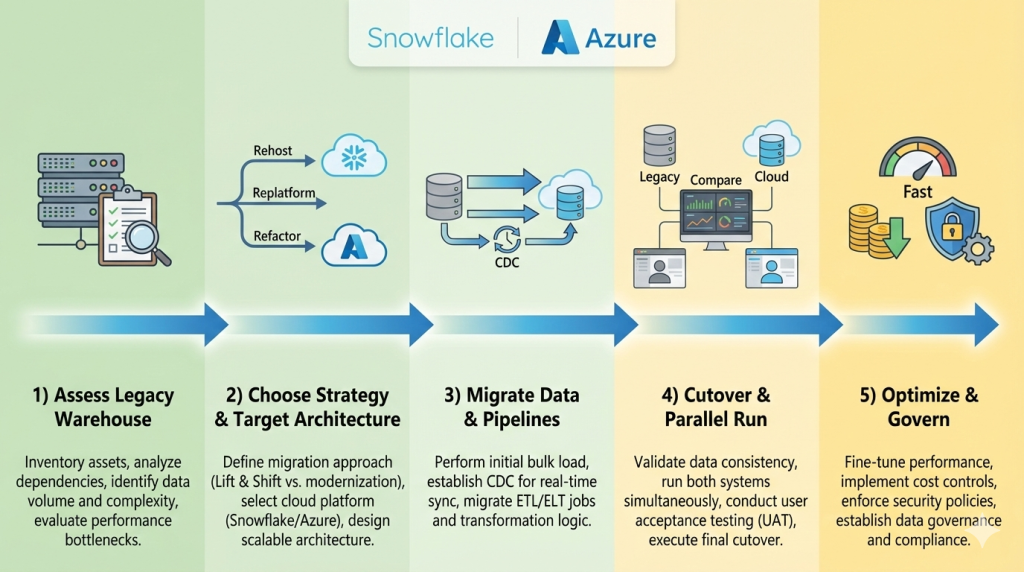
Planning the Migration: Assessment & Architecture
A data migration fails when it is treated as a simple “copy-paste” exercise. Successful migrations start with a ruthless audit of the existing estate – identifying “zombie” data and broken pipelines – before writing a single line of code. The choice of target platform (Snowflake vs. Azure) should be dictated by your specific workload needs, not just brand preference.
Phase 1: The Discovery & Assessment Audit
Before migrating, you must understand what you actually have. Legacy warehouses often contain terabytes of unused data and redundant tables.
- Workload Inventory: Map all ETL jobs, stored procedures, and reports. Identify which are mission-critical and which haven’t been run in years.
- Data Profiling: Assess data quality. Migrating “dirty” data to the cloud just increases your storage bill without adding value.
- Dependency Mapping: Trace how data flows from source (e.g., ERP, CRM) to consumption (e.g., Power BI dashboards). Missing a dependency here causes broken reports later.
Pro Tip: Use this phase to “clean house.” If a table hasn’t been queried in 18 months, archive it to cheap cold storage (Azure Blob / S3) rather than migrating it to your active warehouse.
Phase 2: Choosing the Target Platform
The market is dominated by three major players, each with distinct architectural philosophies. Use this comparison to align the platform with your business goals.
| Feature / Capability | Snowflake | Azure Synapse Analytics | Databricks Lakehouse |
| Primary Strength | Ease of Use & Concurrency. Best-in-class for serving data to thousands of users instantly without tuning. | Microsoft Integration. Unbeatable if you are “all-in” on the Azure stack (Power BI, Data Factory, Excel). | Data Engineering & AI. Built by the creators of Spark; superior for heavy coding, ML models, and complex data processing. |
| Architecture | Multi-Cluster Shared Data. Decouples storage from compute completely. Auto-scales instantly. | Unified Analytics. Combines SQL warehousing with Big Data (Spark) pipelines in a single workspace. | Lakehouse. Open format (Delta Lake) that acts as both a data lake and a warehouse. |
| Scaling & Performance | Instant Elasticity. “T-Shirt sizing” for warehouses (XS to 4XL) allows near-instant scaling for queries. | Dedicated Pools. Pre-provisioned capacity (DWU). Scaling can take minutes and often requires pausing workloads. | Cluster-Based. Highly tunable clusters. Great for massive batch jobs but requires more management than Snowflake. |
| Administration | Near-Zero Maintenance. No indexes to manage, no vacuuming, automatic partitioning. | Moderate Management. Requires DBA tuning (indexing, distribution keys) for optimal performance. | Engineering-Heavy. Powerful but requires skilled data engineers to optimize and manage. |
| Best Use Case | Organizations prioritizing Self-Service BI, SQL analytics, and minimal IT overhead. | Enterprises heavily invested in Azure & Power BI needing a unified SQL + Spark environment. | Teams focused on Machine Learning, streaming data, and heavy data engineering workloads. |
Phase 3: The Target Architecture (Modernization)
Don’t just replicate your on-prem flaws in the cloud. Modernize your architecture:
- Decouple Storage & Compute: Unlike on-prem boxes, cloud platforms let you pay for storage (cheap) separately from compute (expensive). Store all history, but only pay to process what you query.
- ELT over ETL: Switch from “Extract-Transform-Load” to “Extract-Load-Transform.” Load raw data directly into the cloud first, then use the cloud’s massive power to transform it. This ensures you always have a raw backup if transformation logic changes.
- Governance Layer: Implement role-based access control (RBAC) and dynamic data masking (e.g., hiding PII in customer tables) before loading production data.
The Role of a Migration Partner
Navigating these architectural decisions is risky. A partner like Multishoring accelerates this phase by:
- Running automated assessment scripts to map your legacy dependencies.
- Designing a “Landing Zone” architecture that is secure and compliant from Day 1.
- Advising on the “Snowflake vs. Azure” choice based on your specific pricing models and talent pool.
Our Data Consulting & BI Services You Might Find Interesting


Data Warehouse Migration Execution: Moving Data, Schemas, and Pipelines
Successful execution requires a phased approach: schema conversion first, followed by historical data loading, and finally, real-time synchronization of active pipelines. The goal is a “silent” migration where the business experiences zero downtime while the underlying data source shifts to the cloud.
Converting Schemas and Logic
You cannot simply copy a legacy SQL Server or Oracle schema into Snowflake or Azure Synapse.
- Automated Conversion: Use tools like the Snowflake Schema Conversion Tool or Azure Data Factory to handle the bulk of the work.
- Manual Refinement: Proprietary logic—like Oracle PL/SQL stored procedures—often requires manual rewriting into cloud-native languages (e.g., Python or Snowflake Scripting). This is the best time to simplify complex, legacy code.
The Petabyte Challenge: Moving Large Volumes
Moving petabytes of data over a standard internet connection is impractical.
- Physical Transfer: For the initial “bulk load,” use hardware appliances like Azure Data Box or AWS Snowball. You load the data locally and ship the device to a cloud provider.
- Change Data Capture (CDC): Once the bulk data is moved, use CDC tools (like Qlik, Fivetran, or Azure Data Factory) to sync only the data that has changed since the migration started. This ensures your cloud warehouse is always up to date.
Modernizing Pipelines: Shifting from ETL to ELT
Legacy migrations are the perfect time to switch from ETL (Extract-Transform-Load) to ELT.
- Load First: Load raw data into the cloud (Snowflake or Azure Data Lake) immediately.
- Transform Later: Use the cloud’s massive compute power to transform the data after it has landed. This makes your pipelines faster, more flexible, and easier to troubleshoot.
Execution Checklist for Zero-Downtime
- Validation: Run automated tests to ensure data totals in the cloud match the on-prem source.
- Parallel Running: Run both legacy and cloud systems simultaneously for 2–4 weeks.
- Cutover: Once the cloud system is verified, point your BI tools (Power BI, Tableau) to the new cloud endpoint.
By following this phased approach, you mitigate the risk of data corruption and ensure that executives have uninterrupted access to their dashboards throughout the transition.
Optimizing Snowflake/Azure After Migration: Performance, Cost, Governance, and Power BI
Go-live is just the beginning. Realizing the full ROI of your cloud data warehouse requires continuous tuning of query performance, proactive cost management (FinOps), and a governed semantic layer for tools like Power BI.
Performance Tuning
Cloud performance is not static and requires active monitoring.
- Snowflake: Focus on right-sizing virtual warehouses and utilizing multi-cluster warehouses to handle high concurrency.
- Azure Synapse: Optimization involves choosing the appropriate Data Warehouse Units (DWU) and managing distribution keys and columnstore indexes to prevent data skew and bottlenecks.
Cost Optimization & FinOps
One of the biggest risks post-migration is the “lift-and-shift cost trap,” where cloud resources are left overprovisioned or “always-on” like traditional on-prem hardware.
- Techniques: Implement auto-scaling and auto-suspension for idle resources.
- Savings: Use reserved capacity or savings plans for predictable workloads to lower costs.
- FinOps: Adopting a FinOps mindset ensures IT and finance teams align to maximize the value of every dollar spent on cloud compute.
Governance, Security, and Compliance
Transitioning to the cloud requires modernizing your governance framework to maintain data quality, access control, and lineage. Use cloud-native tools like Microsoft Purview or Snowflake’s built-in features (e.g., dynamic data masking and row-access policies) to secure sensitive information and ensure compliance with GDPR or HIPAA.
BI & Analytics with Power BI
For executives, the “last mile” of migration is the most critical. Ensure high-performance reporting by choosing the right connection type – DirectQuery for real-time needs or Import mode for speed-intensive dashboards.
Multishoring specializes in bridging this gap. By leveraging deep expertise in Snowflake, Databricks, and Power BI, we build governed semantic layers that provide a “single version of truth” and deliver production-ready analytics across your enterprise.
Summary and Conclusion
Migrating your legacy data warehouse to Snowflake or Azure is a strategic move that replaces rigid, hardware-constrained environments with the elasticity and advanced analytics required for modern competition. By transitioning from legacy bottlenecks like Oracle or SQL Server to cloud-native platforms, enterprises can eliminate capacity limits, reduce maintenance overhead, and finally enable near-real-time data processing and AI/ML readiness.
Successfully navigating the technical complexities of schema conversion, CDC-based synchronization, and FinOps-driven cost governance requires more than just a cloud subscription – it requires specialized expertise. Getting the architecture right, designing efficient ELT pipelines with Databricks, and building governed semantic layers in Power BI are critical steps to avoiding “lift-and-shift” cost traps and ensuring long-term performance. Multishoring supports organizations across the full lifecycle – from initial strategy and assessment to implementation and ongoing optimization – ensuring a low-risk, high-value transition.
Ultimately, the goal of migration is to empower your business with a “single version of truth” that scales with your growth. Whether you are facing a data center exit or modernizing for better self-service BI, the combination of leading cloud platforms and a proven partner like Multishoring ensures your data estate is secure, compliant, and production-ready. Start with a focused proof of concept to validate performance gains and establish a foundation for your future data-driven initiatives.


