
Content

OpenShift Virtualization and VMware are not one-for-one products. VMware vSphere and VMware Cloud Foundation (VCF) are built around running and operating virtual infrastructure. Red Hat OpenShift Virtualization is a Kubernetes application platform that can also run virtual machines through KubeVirt. That distinction changes the decision.
The useful question is not whether OpenShift is a “VMware alternative” in the abstract. It is whether your estate is ready for a full replacement, a period of coexistence, or an OpenShift-first policy for new workloads. A sound answer starts with workload fit and operating model, not a feature checklist.
OpenShift Virtualization and VMware solve different platform problems
VMware can mean several things in a real estate. Some teams run vSphere with vCenter as their core virtualisation layer. Others use VMware Cloud Foundation, which brings together components such as vSphere, vSAN, NSX and management services in a broader private-cloud stack. The VCF feature comparison shows why those details matter: not every VMware environment has the same storage, networking, automation, or lifecycle dependencies.
Red Hat OpenShift Virtualization, by contrast, lets teams run and manage virtual machines alongside containers on an OpenShift cluster. It uses the KVM hypervisor and KubeVirt to make VMs first-class workloads within Kubernetes. That can create a common platform for existing applications and cloud-native services, but it also asks teams to operate more of their estate through Kubernetes concepts and practices.
| VMware vSphere or VCF | OpenShift Virtualization | |
|---|---|---|
| Primary orientation | Virtual machines and private-cloud infrastructure | Kubernetes application platform that also runs VMs |
| Core operating objects | Hosts, clusters, datastores, networks, and VMs | Clusters, namespaces, Kubernetes resources, containers, and VMs |
| Typical reason to choose it | Established VM operations and an existing VMware-aligned stack | One operating model for VM-based and containerised workloads |
| Key assessment question | Which VMware components and integrations are actually in use? | Can the platform team operate VM workloads through a Kubernetes-based model? |
Neither side is featureless. VMware environments can include Kubernetes capabilities, particularly in VCF. OpenShift Virtualization does not turn every VM into a cloud-native application simply because it runs on Kubernetes. The difference is the control plane and the operating discipline you are choosing for the next stage of the estate.
Where IBM-managed OpenShift fits
The comparison above is about the platforms, not a single hosting model. For organisations already using IBM Cloud, Red Hat OpenShift on IBM Cloud is a managed OpenShift service that can support VM-based workloads and application modernisation at a measured pace. IBM positions the service for consistent OpenShift operations across hybrid and multicloud environments, with IBM Cloud identity, observability, and security integrations.
That managed option can reduce some cluster provisioning and day-to-day infrastructure work. It is a deployment option, not a migration shortcut. Teams still need to decide which VMs are suitable to move, what dependencies must be retained, and whether they are ready to own a Kubernetes-based operating model.
Compare the operating model before the feature checklist
A comparison table is useful only when it asks the same question of both platforms. The table below is not a winner’s scorecard. It highlights the areas that most often change the migration path.
| Decision area | VMware vSphere or VCF approach | OpenShift Virtualization approach | What to validate in your estate |
|---|---|---|---|
| VM lifecycle | VM-centred administration through the VMware control plane | VMs are managed as Kubernetes workloads alongside containers | Can your VM operations team work with namespaces, policies, and Kubernetes tooling? |
| Application platform | Strong fit for traditional VM estates and private-cloud operations | A common platform for VM-based and cloud-native applications | Which applications have a credible modernisation path, and which should remain conventional VMs? |
| Network and storage | May depend on the specific vSphere, vSAN, NSX, and partner-tool configuration | Requires an OpenShift design for networking, storage classes, and persistent workloads | Which network, storage, and security behaviours are application-critical? |
| Automation and delivery | Often built around VMware administration tooling and established runbooks | Encourages declarative configuration and platform automation | Which existing runbooks can be reworked, and which must continue during coexistence? |
| Backup, DR, and ISV support | Often anchored in a mature set of current tools and product certifications | Must be validated for the target OpenShift version, storage design, and applications | Does every critical workload have an approved protection and support path? |
VM lifecycle is only part of the decision
If the requirement is simply to keep a stable VM estate running with familiar processes, a VMware renewal can be the lower-risk operational decision. If the aim is to bring VM-based applications closer to the delivery, automation, and governance model used for containers, OpenShift Virtualization may be the better platform direction.
That does not mean moving every VM. Appliance-like systems, tightly coupled legacy software, or workloads with narrow vendor support can be poor first candidates. The first migration wave should prove a repeatable pattern, not prove that every workload can be moved.
Network, storage, backup, and support shape the real migration risk
The hardest parts of a VMware-to-OpenShift migration are rarely the VM files alone. Network controls, address plans, firewall dependencies, shared storage behaviour, backup schedules, disaster-recovery procedures, licensing terms, and application support obligations can all affect what is safe to move and when.
Red Hat provides a Migration Toolkit for Virtualization for moving supported VMware workloads to OpenShift Virtualization. A migration tool is an enabler, not a decision. It cannot determine whether a workload is appropriate for the target platform or replace a tested recovery process.
Containers change the platform conversation
OpenShift is attractive when platform engineering wants a consistent place to run both current VMs and newer containerised services. The value is not that every application must be rewritten immediately. It is that teams can reduce the number of distinct operating models they need to build for over time.
This is also where the skills question becomes concrete. A team accustomed to VM administration may need to strengthen its Kubernetes, GitOps, platform security, and application-delivery practices. That investment can be justified by a broader modernisation strategy. It is harder to justify if the only objective is to reproduce the current VM estate on a different control plane.
Cost and licensing – calculate the estate, not a list price
There is no reliable universal answer to “Is OpenShift cheaper than VMware?” A list-price comparison leaves out the costs that determine the result: the actual renewal offer, the VMware edition and components in use, OpenShift subscriptions, hardware or cloud capacity, migration delivery, backup and DR tooling, training, and the temporary cost of running two platforms.
Use a cost model that separates three periods:
- Run today. Document current platform subscriptions, infrastructure, operations, support, and the tools attached to the VMware estate.
- Move. Include assessment, pilot work, migration waves, remediation, training, parallel running, and any replacement integrations.
- Run the target state. Model the steady-state platform, operational roles, support arrangements, and the workloads that will remain outside it.
The answer may favour a full replacement, coexistence, or staying with VMware for a defined set of workloads. It can also differ by application group. Treat cost as a scenario decision with assumptions you can inspect, not as a vendor claim you can reuse.
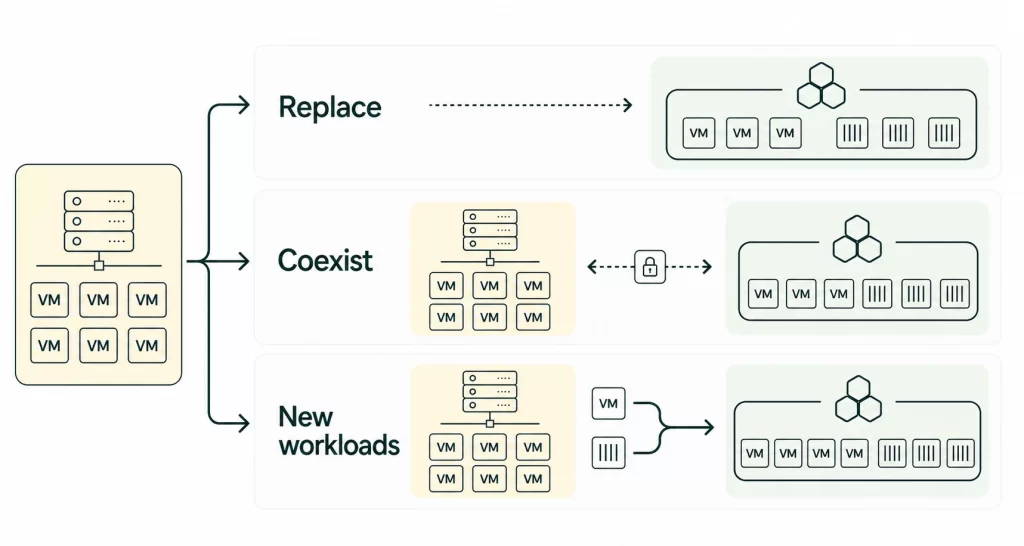
Three adoption patterns: replace, coexist, or use OpenShift for new workloads
The three paths below are not maturity levels. Each can be the right target state when it matches the estate and the business objective.
Replace VMware when the operating model is ready to change
A full replacement is most credible when the organisation already has strong OpenShift or Kubernetes capability, a clear list of VM candidates, and a reason to simplify around a common application platform. It also needs proof that the target design covers network, storage, backup, DR, monitoring, and vendor support for critical workloads.
This path works best when migration is part of a larger platform strategy, not a rushed response to a renewal date. Start with representative but non-critical workloads, then use the results to refine the landing zone, templates, recovery process, and operational ownership before increasing the size of each wave.
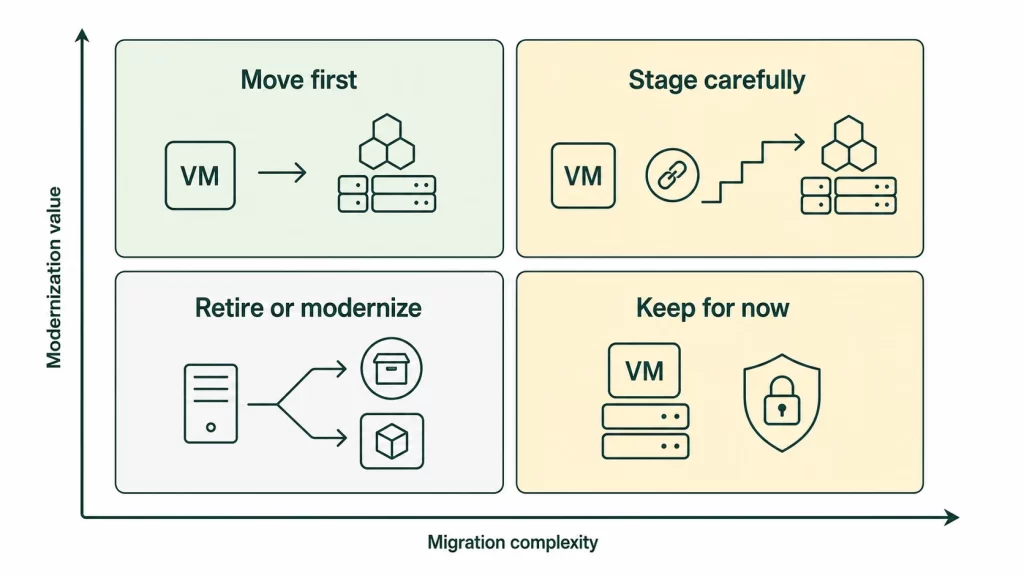
Avoid a full-replacement mandate when the estate has not been classified. A large VM inventory is not a migration plan. Some workloads may belong on OpenShift, some may need to remain on VMware temporarily, and some may be candidates for retirement or legacy modernisation services.
Coexist when the estate cannot move in one step
Coexistence is often the most practical option for a mixed estate. VMware continues to run systems with complex dependencies or a high cost of disruption, while OpenShift Virtualization becomes the destination for agreed workload groups and newer application patterns.
For this to work, coexistence needs boundaries. Define which workloads can be placed on each platform, how identity and network policies work across both, what monitoring and backup visibility is required, and who owns the interfaces between teams. Without those rules, the organisation simply adds another platform to operate.
Coexistence also gives the team time to build evidence. Each migration wave can test operational procedures and uncover dependencies before they become a production incident. It is a strategy, not a failure to decide.
Use OpenShift for new workloads when the immediate priority is modernisation
An OpenShift-first policy for new workloads is the lowest-disruption path when existing VMware systems are stable, but the organisation wants to stop extending its future dependency on a VM-only operating model. New services can be developed as containers where appropriate, while compatible VM-based applications can be brought onto OpenShift Virtualization when there is a practical reason.
This option is especially useful when platform teams need time to build operating capability before taking on large migration waves. It does need governance. Set a clear exception process and review date; otherwise “new workloads only” can become a permanent holding pattern with no target architecture.
Which path fits your estate and skills?
Choose the pattern that reduces operational risk while moving the platform strategy forward. Start with the path that limits irreversible change while closing the biggest capability gap. The table is a decision aid, not a substitute for application assessment.
| If your environment looks like this | The most likely starting path | What must be true before you proceed |
|---|---|---|
| A strong OpenShift practice already exists, with many VM candidates and a clear consolidation goal | Replace in waves | Recovery, networking, storage, and support have been proven for representative workloads |
| Critical systems have different dependency profiles, and the VMware exit cannot be treated as one event | Coexist | Platform boundaries, ownership, and cross-platform controls are designed before migration starts |
| VMware remains stable, but new digital products need a Kubernetes application platform | New workloads only | The policy has a target architecture, guardrails, and a planned review point |
| The estate is poorly understood, or no team owns the target operating model | Assessment before commitment | A workload inventory and operating model review produce an evidence-based path |
The last row matters more than it appears. When the estate is not well understood, a product decision simply turns unknown dependencies into project risk. A focused assessment should classify workloads by business criticality, technical fit, data and network dependencies, recovery needs, licensing, and owner readiness. That work also provides the input for a realistic data migration plan, where data and platform moves are linked rather than treated as separate projects.
If you are weighing renewal, migration, and platform modernisation at the same time, book a platform fit assessment. It should produce a recommendation that includes the option to keep VMware where that remains the sensible call.
Not sure which virtualization path fits your estate?
A focused platform assessment maps workload fit, dependencies, migration risk, and operational readiness before you commit to replacement or coexistence.
Choose the target operating model..

Choose the target operating model.
What to validate before a renewal or migration plan?
Before signing a renewal or committing to migration waves, establish evidence for the following:
- a workload inventory that distinguishes retire, retain, rehost, and modernise candidates;
- application owners who can confirm business criticality and change windows;
- the VMware components, integrations, and contracts that each workload relies on;
- a target design for OpenShift networking, storage, security, identity, and observability;
- a backup and disaster-recovery test for the target path, not only a design document;
- an ISV and operating-system support check for every critical workload;
- an operating model that names who owns platform engineering, VM operations, and application delivery;
- a pilot with measurable success criteria, including recovery and rollback;
- a financial model that separates current run cost, migration cost, and target-state cost.
The right path is the one you can operate safely after the migration team leaves. For many organisations, that will be a staged coexistence model. For others, a broader OpenShift transition is justified. The evidence should decide.
Our Data & IBM Services You Might Find Interesting

Data Migration
Plan controlled data moves that align application migration waves with operational continuity requirements.

Modern Data Architecture Services
Design a connected data foundation that supports governed retrieval across cloud and on-premises systems.

IBM Planning Analytics & watsonx Consulting
Translate AI-ready data controls into a practical IBM Red Hat OpenShift roadmap and delivery plan.
Frequently asked questions
Is OpenShift Virtualization a direct VMware replacement?
Not in a one-for-one sense. OpenShift Virtualization can run VM workloads and provides a path to consolidate VM and container operations, but VMware vSphere and VCF estates have their own storage, networking, management, backup, and support dependencies. The right comparison is workload by workload and operating model by operating model.
Can VMware and OpenShift Virtualization coexist?
Yes. Coexistence is often the safer path for a mixed estate, especially when critical applications cannot move in a single wave. It works when workload placement, shared controls, ownership, and the target-state timeline are explicit.
Should every VMware VM move to OpenShift?
No. Some VMs may be good candidates for migration, some may be better retained while dependencies are resolved, and others may be retired or modernised. A repeatable assessment process is more useful than an all-or-nothing target.
Is OpenShift Virtualization cheaper than VMware?
It may be, but no generic price claim is reliable enough for a platform decision. Compare the effective renewal cost, subscribed components, migration effort, parallel running, support tooling, infrastructure, and the operating team required for each scenario.


