
Content

A VMware to OpenShift migration should begin with an assessment, not a promise to move every virtual machine. A licensing renewal may create urgency, but it does not tell you whether an application is suitable for the target platform, whether its recovery process will still work, or which dependencies must move with it.
Red Hat OpenShift Virtualization runs virtual machines as Kubernetes workloads through KubeVirt. That can help an organization bring VM-based applications closer to the platform used for containers, but it is not a lift-and-shift exercise. Networking, storage, backup, disaster recovery, security, support, and the day-to-day work of operating the platform all need a deliberate target design. Prove a repeatable migration pattern before you expand the scope.
If you are still deciding whether the destination should replace VMware, coexist with it, or host new workloads only, start with OpenShift Virtualization vs VMware: How to Choose. This guide focuses on the next question: how to plan a migration once OpenShift Virtualization is a credible path.
Why VMware to OpenShift migration should start with an assessment
The first decision is not which migration tool to use. It is whether each workload has a safe destination and an owner who can validate it. A VM inventory alone cannot answer that question. It records what is running, but not necessarily the application dependencies, recovery expectations, licensing restrictions, or change windows that determine migration risk.
The assessment should create a workload-by-workload view of the estate. For each VM or application group, capture business criticality, technical owner, operating-system and application support, network dependencies, storage behavior, backup requirements, recovery objectives, and integration points. Include the VMware components and operational tools that the workload relies on today.
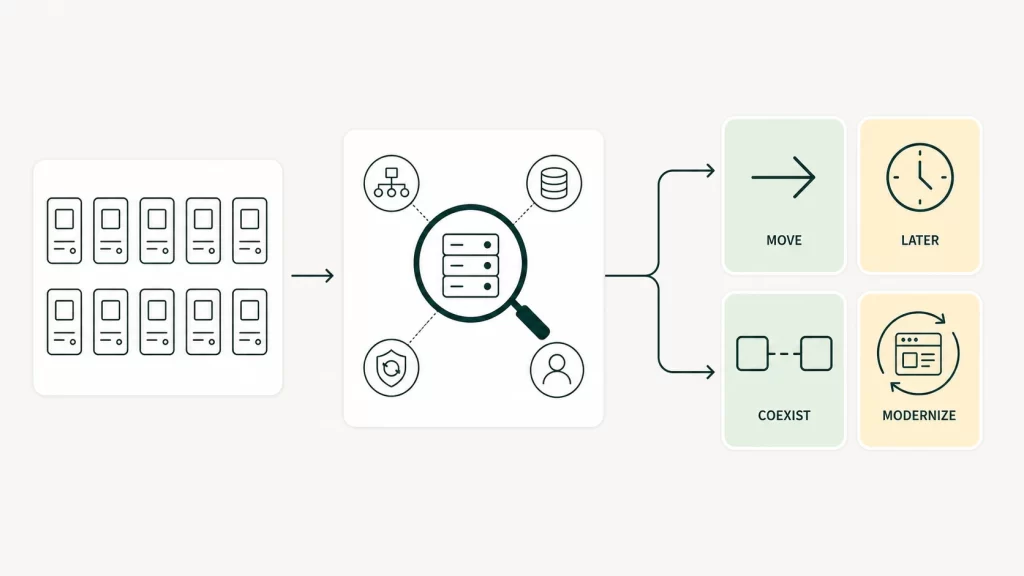
That work should end with a disposition, not a generic migration target:
- Move when the workload fits the target design and a recovery path can be tested.
- Move later when the platform pattern is sound but dependencies or timing need more work.
- Retain temporarily when the risk of change is higher than the benefit of an immediate move.
- Retire or modernize when a like-for-like VM migration would preserve an application that no longer has a useful future state.
The assessment also separates a VMware exit from a wider modernization program. Some applications need a new home. Others need integration cleanup, data work, or a product decision before they move anywhere. Where interfaces are poorly understood, an integration audit can make hidden dependencies visible before they become a migration-wave surprise.
What OpenShift Virtualization needs before you migrate VMs
OpenShift Virtualization needs a production-ready landing zone before it receives production VMs. Installing the platform is only one part of that work. The target must have agreed patterns for connectivity, persistent storage, identity, monitoring, backup, recovery, access control, and operational ownership.
Red Hat’s Migration Toolkit for Virtualization helps move supported VMware vSphere workloads to OpenShift Virtualization. Red Hat also identifies access to vSphere, an OpenShift subscription, and a clear VM and datastore inventory as migration prerequisites. The migration tool moves workloads; it does not design the platform or approve the risk.
What changes in a KubeVirt-based target platform
KubeVirt is the component that allows OpenShift to run virtual machines alongside containerized workloads. For a VMware operations team, the change is less about converting a disk image and more about moving to a Kubernetes-based control plane. VM operations now connect with cluster capacity, namespaces, policies, storage classes, and the broader OpenShift operating model.
That affects several practical design choices:
- Networking: define how VM networks, IP addressing, DNS, firewall rules, load balancing, and connectivity to systems that remain on VMware will work.
- Storage: select supported storage classes and confirm performance, snapshots, replication, and capacity behavior for each workload type.
- Backup and disaster recovery: prove that backups restore correctly and that the intended recovery procedure meets the application’s actual needs.
- Security and access: map administrator access, service accounts, secrets, logging, and monitoring to the target operating model.
- Operations: decide who handles platform incidents, VM lifecycle tasks, patching, capacity planning, and application handoffs after the migration team has left.
These are not generic architecture checks. A database server with demanding storage behavior, a VM that depends on fixed network rules, and a vendor appliance with narrow support conditions should not be assumed to share the same migration pattern. A target design is ready only when it supports the workload behavior you intend to move first.
Where managed OpenShift services fit
Some organizations may choose a managed OpenShift deployment rather than operate every cluster layer themselves. Red Hat OpenShift on IBM Cloud is one option for teams using IBM Cloud. IBM describes it as a managed service with IBM Cloud identity, security, observability, and lifecycle-management integrations.
That can reduce parts of the cluster provisioning and platform operations burden. It does not remove the need to assess VM suitability, design connectivity and recovery, validate support, or assign ownership. Managed OpenShift changes who operates selected platform layers, not the responsibility to migrate an application safely.
Do you know which VMs are ready to move?
A focused migration assessment maps workload fit, platform dependencies, and safe migration waves before execution begins.
Choose the target operating model..

Choose the target operating model.
Which VMs should move first in a VMware to OpenShift migration
The best first wave is representative enough to test the target pattern, yet contained enough that a failed assumption does not become a business outage. It is rarely the oldest VM, the newest VM, or the least important VM by default.
Good early candidates usually have a clear owner, a documented application dependency set, and a change window that can accommodate validation and rollback. They should use a storage and networking pattern that will recur later, so the team learns something reusable. A business-critical workload can be included only if it is genuinely manageable and the recovery process has been tested rather than left as a design assumption.
| Workload signal | Likely disposition | Why |
|---|---|---|
| Known owner, stable dependencies, supported operating system, and reproducible backup | Early pilot or first migration wave | Tests a real pattern without relying on undocumented exceptions |
| Important application with clear dependencies but a tight recovery requirement | Later controlled wave | Move after the target protection and rollback method have been proven |
| Vendor appliance, unsupported system, or VM with unclear licensing terms | Retain or assess separately | The platform may run it, but support and recovery assumptions need evidence |
| Application with obsolete interfaces or no active business owner | Retire or modernize | A like-for-like migration can carry an avoidable liability into the new platform |
Avoid using a disposable test VM as the only pilot. It may confirm that a basic migration works while proving nothing about the storage, security, recovery, or operational controls that production applications need. The first wave should test the hardest common conditions, not an artificial success case.
When a workload depends on an external data move or a broader infrastructure transition, plan it with that work rather than treating it as a separate stream. The principles in this on-premise-to-cloud migration guide are useful here too: sequence dependencies, establish validation criteria, and retain a way back while the target is still being proven.
How to plan safe OpenShift Virtualization migration waves
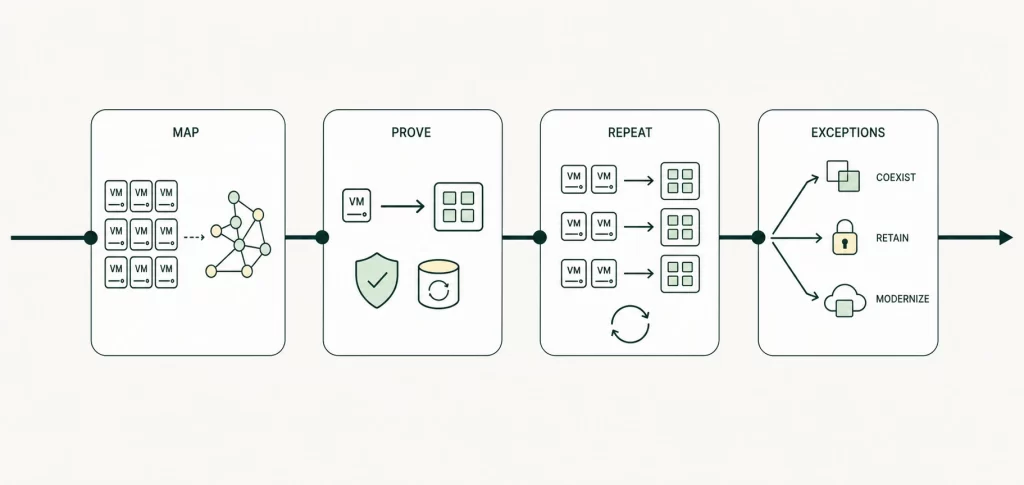
A wave plan turns a large VMware exit into a sequence of controlled decisions. Each wave should have a defined workload group, target-platform pattern, technical owner, business owner, validation plan, rollback condition, and explicit go or no-go point. Grouping VMs only by size or by migration date usually misses the dependencies that matter.
Wave 0: assess, design, and establish the operating baseline
Before moving production workloads, confirm the inventory, application grouping, target architecture, access model, network path, storage design, monitoring, backup, and recovery approach. Capture the cost and license assumptions that will be used in later decisions. The goal is a baseline that lets the team recognize exceptions rather than discover the entire estate during migration.
Wave 1: prove one repeatable migration pattern
Use a limited group that represents a common workload type. Migrate it, validate the application, test backup and restore, check monitoring and support handoffs, and rehearse rollback. Red Hat’s migration guidance notes the need to monitor cluster resources, manage migrated VMs after the move, and check migration logs. Those operational checks belong in the acceptance criteria, not in a post-migration clean-up list.
Use this wave to confirm that the platform, runbooks, and ownership model work together under real conditions.
Repeatable waves: move application groups, not isolated machines
Once the pattern is proven, group workloads by shared dependencies and change constraints. A useful wave might include an application tier, its supporting services, the required network and storage pattern, and the people who can validate it. Keep the wave small enough to diagnose issues, but substantial enough to validate a repeatable process.
At the end of each wave, review what changed. A network exception, unexpected backup behavior, or lack of owner availability may justify changing the next wave. That is normal. A wave plan should learn as it moves, while keeping decision criteria visible.
Final waves: handle exceptions deliberately
The final workload groups often contain the difficult cases: tightly coupled systems, appliances, systems with limited support, or applications with expensive downtime. Do not force them into the same schedule as straightforward VMs simply to meet a platform target.
For each exception, choose among a later migration, temporary coexistence, retirement, modernization, or a retained VMware footprint. A well-run program may finish with a smaller scope than its opening inventory. Completing a safe, defensible migration plan matters more than declaring every VM moved.
Resolve licensing, support, and cost before you scale
VMware licensing cost often triggers the conversation, but a migration business case needs more than a renewal quote. Compare the real options across the full period in which the organization will operate them: the current environment, the migration program, and the target state.
Do not use a generic claim that OpenShift is cheaper or that a VMware exit automatically reduces cost. The answer depends on the VMware edition and components in use, OpenShift subscriptions, hosting or hardware capacity, migration effort, backup and disaster-recovery tooling, training, support, and the temporary cost of running two platforms.
Use three views in the cost model:
- Current run cost: subscriptions, infrastructure, support, operations, and attached tools.
- Transition cost: assessment, platform build, pilots, remediation, data or integration work, parallel running, and change management.
- Target run cost: the OpenShift platform, capacity, operating roles, support model, and any workloads that remain elsewhere.
Support should be treated with the same discipline. Confirm the operating-system and application vendor position for the intended target, as well as the backup, disaster-recovery, and security tooling that each critical workload needs. A migration is only complete when the business can support and recover the application in its new home.
Our Data & IBM Services You Might Find Interesting

Data Migration
Plan controlled data moves that align application migration waves with continuity and recovery requirements.

Modern Data Architecture Services
Design a target platform architecture that supports VM workloads, dependencies, and future modernization.

IBM Planning Analytics & watsonx Consulting
Translate AI-ready data controls into a practical IBM Red Hat OpenShift roadmap and delivery plan.
What a decision-ready VMware exit assessment should produce
An assessment earns its place when it produces a decision that engineering, operations, finance, and application owners can act on. It should not end as a generic readiness score or a slide deck that says “migrate in phases.”
A decision-ready output normally includes:
- a workload inventory grouped into move, move later, retain, retire, and modernize decisions;
- a dependency map covering application, network, storage, identity, backup, recovery, and support requirements;
- a target-platform design with explicit assumptions and unresolved exceptions;
- a migration-wave plan with owners, validation steps, rollback criteria, and decision gates;
- a licensing and cost model that separates current, transition, and target-state assumptions; and
- a recommended target state, including where temporary VMware and OpenShift coexistence remains the lower-risk choice.
Build and prove the target pattern, migrate a representative first wave, then let the evidence determine the pace and scope. A VMware exit is a program of controlled operational change, not a file-conversion project.
Frequently asked questions
Can I migrate all VMware VMs to OpenShift Virtualization?
Possibly, but do not make that assumption before assessment. Some VMs will fit the target design, some may need a later wave, and others may be better retained, retired, or modernized. Support terms, recovery needs, dependencies, and operating-model readiness all affect the answer.
How long does a VMware to OpenShift migration take?
There is no credible universal timeline. The duration depends on the estate, the readiness of the target platform, dependency complexity, change windows, recovery requirements, and the number of repeatable workload patterns. An assessment should establish a wave plan before the program makes delivery-date promises.
Are OpenShift managed services the best destination for migrated VMs?
They can be a fit when the organization wants a managed OpenShift operating model and the hosting, integration, security, and data-residency requirements align. They are not automatically the right destination. The same workload assessment and target-design checks still apply.


