
Content

Snowflake is secure by default. But default settings don’t make you compliant.
If your organization processes personal data – customer records, financial transactions, employee information – and stores it in Snowflake, you are responsible for proving compliance with GDPR and ISO 27001. Snowflake gives you the tools. Whether those tools are properly configured, governed, and auditable is entirely on your team.
This gap matters more than ever in 2026. The most publicized Snowflake-related security incidents weren’t caused by flaws in Snowflake’s platform. They were caused by weak authentication, missing MFA, over-privileged accounts, and absent monitoring – all on the customer side of the shared responsibility line.
The stakes are especially high for organizations currently migrating off Oracle, SQL Server, or end-of-support platforms like Fiserv. A “lift and shift” approach moves your data to the cloud. It does not move your compliance posture. Without intentional security and governance design built into the migration, you inherit legacy risks inside a modern platform – and face your first ISO audit or GDPR inquiry with a Snowflake environment that wasn’t designed to pass one.
This article covers what ISO 27001 and GDPR actually require from a Snowflake deployment, how to harden a production environment against the most common failure points, and how to build the audit trail that proves you’re in control.
Is your Snowflake environment actually audit-ready – or just live?
We design Snowflake security and governance as part of every Oracle, SQL Server, and legacy platform migration – so your RBAC, masking policies, and audit trails are in place before go-live, not six months after.
Stop inheriting security debt from legacy systems.

Stop inheriting security debt from legacy systems.
Understanding Snowflake’s Security Model for ISO 27001 and GDPR
The starting point for any compliance conversation is understanding what Snowflake secures for you – and what it doesn’t.
Snowflake operates on a shared responsibility model. The platform handles physical infrastructure, base networking, and core encryption. Your organization is responsible for everything above that: who has access, what they can see, how data is classified, and whether your audit logs are actually reviewed.
This distinction is where most compliance gaps live.
What Snowflake Handles by Default
Out of the box, Snowflake provides a solid security foundation:
- Encryption at rest and in transit – All data is encrypted using AES-256. All client connections use TLS. This happens automatically, with no configuration required.
- Hierarchical key management – Snowflake uses a layered key model rooted in cloud provider HSMs (AWS KMS, Azure Key Vault, or Google Cloud KMS depending on your deployment). Keys are rotated automatically.
- Multi-tenant isolation – Each Snowflake account is logically isolated. Customer data is never commingled across accounts.
- Platform-level certifications – Snowflake holds SOC 2 Type II, ISO 27001, PCI DSS, HIPAA, and FedRAMP certifications. These cover the platform itself, not your configuration of it.
For organizations with stricter regulatory requirements, Snowflake also offers Tri-Secret Secure – a customer-managed key option where data can only be decrypted using a combination of Snowflake’s key and a key held in your own cloud KMS. If Snowflake loses access to your key, your data becomes inaccessible. This is relevant for financial services and healthcare environments where key sovereignty is a hard requirement.
Where Your Responsibility Begins
Everything Snowflake provides at the platform level is a starting point, not a finish line. ISO 27001 and GDPR require documented, auditable controls – and those controls are yours to design and maintain.
| Layer | Snowflake Responsibility | Your Responsibility |
|---|---|---|
| Infrastructure | Physical security, base network, hardware | – |
| Platform | Encryption, key rotation, TLS, certifications | Tri-Secret Secure (optional) |
| Identity & Access | Authentication framework, RBAC engine | Role design, MFA enforcement, user lifecycle |
| Data Protection | Masking, classification, RAP capabilities | Policy design, PII tagging, deletion workflows |
| Auditing | ACCOUNT_USAGE logs, Access History | Monitoring, alerting, evidence packs |
| Governance | Policy engine | Governance framework, access reviews |
How This Maps to ISO 27001 and GDPR
ISO 27001 Annex A controls and GDPR principles don’t map to a single feature. They map to how your environment is designed end to end.
ISO 27001 alignment:
- Access control (A.9) – Snowflake’s RBAC engine supports least-privilege access and segregation of duties, but only if you design roles that way
- Cryptography (A.10) – AES-256 encryption and TLS are in place; Tri-Secret Secure extends this for key sovereignty requirements
- Operations security (A.12) – ACCOUNT_USAGE views and Access History provide the logging and monitoring evidence auditors expect
- Supplier relationships (A.15) – Snowflake’s data sharing and external functions create third-party data flows that need to be documented and governed
GDPR alignment:
- Integrity and confidentiality (Art. 5(1)(f)) – Encryption and access controls address this, but only when correctly configured
- Data minimization (Art. 5(1)(c)) – Row access policies and masking limit exposure to only what each role needs to see
- Right to erasure (Art. 17) – Snowflake supports standard SQL deletions, but Time Travel and Fail-Safe must be configured deliberately to avoid retaining data beyond legal deadlines
- Accountability (Art. 5(2)) – Requires documented policies, access reviews, and audit logs – none of which exist unless you build them
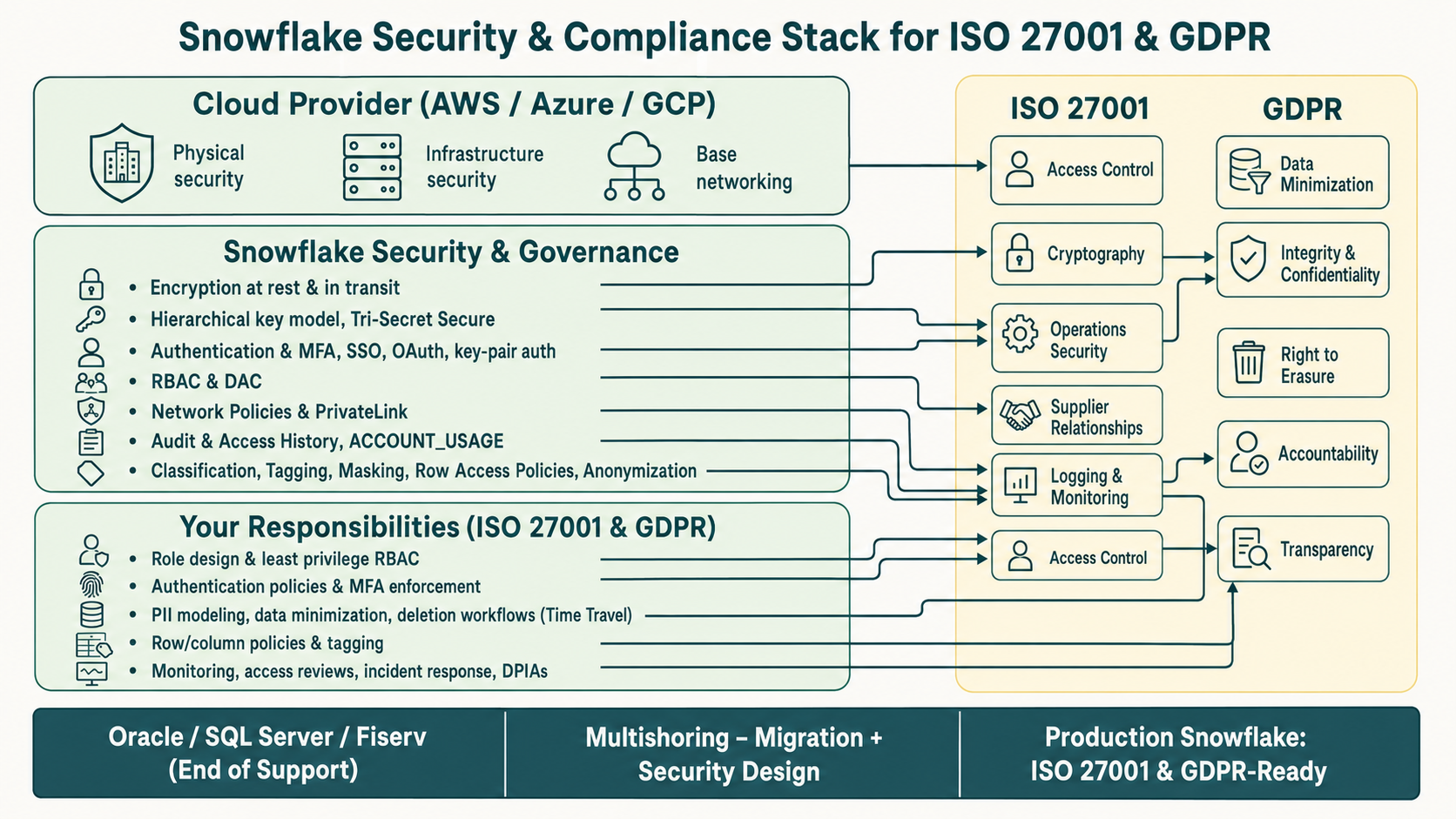
The core message is this: Snowflake’s certifications tell an auditor that the platform is trustworthy. Your configuration tells them whether your deployment is compliant. Section 2 covers exactly how to build that configuration in a production environment.
Production Hardening: Authentication, Network, and Access Control
Most Snowflake security failures aren’t platform failures. They’re configuration failures – weak authentication, open network access, and roles with far more privilege than anyone intended. Here’s what to lock down before an auditor or regulator asks.
Authentication: Close the Most Obvious Gap First
Enforce MFA for every human user – through your identity provider (Okta, Azure AD) via SSO/SAML 2.0. This gives you centralized enforcement and a single audit trail. Back it up with Snowflake’s Authentication Policies to block password-only logins for admin accounts and restrict which clients can initiate sessions.
For service accounts and automated pipelines: use key-pair authentication only, rotate keys quarterly, and block interactive logins entirely via policy. Service accounts with standing passwords and no rotation are a direct ISO 27001 finding – and a real attack surface.
Regularly query LOGIN_HISTORY and USERS views to catch inactive or orphaned accounts. Unreviewed access is one of the most common audit findings, and one of the easiest to prevent.
Network: Don’t Leave the Front Door Open
By default, your Snowflake account is reachable from any IP on the internet. Fix this on day one:
- Network Policies – Allowlist known IP ranges (corporate, VPN, pipeline infrastructure). Apply a baseline at account level, tighter restrictions at user level for privileged roles.
- PrivateLink – For production environments with regulated data, route traffic privately between your cloud VPC and Snowflake. Required for a credible ISO 27001 A.13 posture and GDPR Article 32 compliance.
- Outbound network rules – Every external function, stage, or Snowpipe connection is a potential GDPR third-party data transfer. Allowlist trusted endpoints only and document each one in your Records of Processing Activities.
RBAC: Design Roles for an Auditor, Not Just for Convenience
The most common finding in Snowflake access control reviews: ACCOUNTADMIN used for routine tasks, no separation between security and data admin functions, and privilege grants nobody remembers approving.
The fix is straightforward in principle:
- Reserve ACCOUNTADMIN for break-glass scenarios only
- Separate SECURITYADMIN (user/role management) from SYSADMIN (database objects) – this enforces segregation of duties
- Build custom functional roles per domain (
FINANCE_ANALYST,ETL_PIPELINE_PROD) and grant data privileges there, not to system roles - Keep DEV, TEST, and PROD environments separate, with separate roles – production roles should never be used for experimentation or ad-hoc queries
Audit GRANTS_TO_ROLES and GRANTS_TO_USERS quarterly. Privilege creep is silent and cumulative.
The Migration-Specific Risk: Oracle, SQL Server, and Fiserv
This is where hardening gets genuinely complicated – and where most organizations underestimate the risk.
Legacy database environments carry security debt that’s invisible until it causes a problem. Oracle and SQL Server deployments built over years typically include “god roles” with unrestricted access granted long ago and never reviewed, service accounts tied to applications that no longer exist, no real environment separation, and user accounts backed by directory services that have since changed or been decommissioned.
For organizations leaving Fiserv platforms hitting end-of-support, the pressure is even higher. End-of-support means no more security patches, increasing regulatory scrutiny, and a migration timeline that often compresses security design into the final weeks of a project.
A lift-and-shift migration copies your data. It also copies your security debt.
The right approach is to treat the migration as a security reset, not a replication exercise:
- Audit legacy roles before migrating them. Map Oracle or SQL Server privileges to a Snowflake RBAC target state that reflects what users actually need today – not what was granted five years ago. This is the moment to eliminate “god roles” permanently.
- Validate every service account against your current IdP. If an account isn’t backed by an active identity in your directory, it doesn’t get recreated in Snowflake. No exceptions.
- Design network architecture upfront. PrivateLink configuration and network policies need to be part of the migration specification – not a post-go-live ticket.
- Stand up ACCOUNT_USAGE monitoring before go-live. You need a security baseline from day one, not after your first incident.
The business case is clear: retrofitting security governance onto a live Snowflake environment costs significantly more – in time, in consulting fees, and in audit remediation risk – than building it in during migration. Organizations that defer this work routinely face 3-6 month remediation programs before they can present a credible compliance posture to auditors.
Multishoring designs security and governance as an integrated workstream in every Oracle, SQL Server, and legacy platform migration to Snowflake. By the time the environment goes live, RBAC is documented, network controls are in place, and the audit trail has already started. Not as a post-migration add-on – as part of the migration itself.
Our Services You Might Find Interesting

Oracle to Snowflake Migration
We migrate Oracle databases, Oracle E-Business Suite, and Oracle Fusion and Financials Cloud to Snowflake.

SQL Server to Snowflake Migration
We run end-to-end SQL Server to Snowflake migrations. Assessment, pipeline build, parallel validation and cutover.

Data Warehouse Consulting Services
We design, build, and modernize data warehouses that bring order to your fragmented data.
Protecting PII and Sensitive Data: Masking, Row-Level Security, and Encryption
Snowflake gives you the tools to implement fine-grained data protection. The question is whether you’ve actually used them – and whether you can prove it to a regulator.
GDPR requires more than keeping data safe. It requires demonstrating confidentiality, minimization, purpose limitation, and the ability to delete. Here’s how each maps to concrete Snowflake controls.
Classify First, Protect Second
You can’t protect what you haven’t identified. Snowflake’s Data Classification feature automatically scans columns and assigns semantic tags – detecting PII like names, email addresses, national IDs, and financial identifiers without manual tagging.
Once classified, use object tags to mark sensitive columns, tables, and views. Tags do two things simultaneously: they make PII visible across your entire data estate, and they act as the trigger for downstream masking and access policies.
For GDPR, this is your foundation for Records of Processing Activities – you can query your tag inventory to show exactly where personal data lives, who can access it, and under what conditions.
Column-Level Security: Control What Users See at Query Time
Dynamic data masking lets you define a masking policy on a column and apply it based on the querying role. A customer service rep sees XXX-XX-1234. A compliance officer sees the full SSN. The underlying data never changes – only the view of it does.
This directly addresses GDPR’s need-to-know principle: personal data should only be visible to roles with a documented justification for seeing it.
Practical patterns worth implementing:
- Conditional masking – mask unless the user holds a specific role or attribute
- Hashing/tokenization – replace identifiers with deterministic tokens for analytics use cases where the actual value isn’t needed
Row-Level Security: Limit Which Records Each Role Can See
Row Access Policies (RAP) restrict which rows a query returns based on the role executing it. A regional manager sees only their region’s customer records. A business unit analyst sees only their unit’s transactions.
Critically, RAPs apply consistently across Secure Data Sharing – when you share a Snowflake dataset with a partner or another internal account, your access controls travel with the data. This is a meaningful compliance control for multi-tenant environments and cross-entity data sharing under GDPR.
Encryption and the Right to Be Forgotten
All data is encrypted at rest (AES-256) and in transit (TLS) by default. For environments with strict key sovereignty requirements, Tri-Secret Secure gives you a customer-managed key where Snowflake cannot decrypt your data without your cloud KMS participation.
The GDPR complexity here is Time Travel and Fail-Safe. Snowflake retains historical data versions – up to 90 days for Time Travel, plus an additional Fail-Safe period. This creates a direct tension with Article 17 right to erasure requests.
How to manage it:
- Set Time Travel retention to 7-30 days for tables containing PII – not the 90-day default
- Segregate PII into dedicated tables so deletion can be targeted without affecting unrelated data
- Log every erasure request and execution in a dedicated audit table, so you can demonstrate compliance even if a restore operation occurs later
| GDPR Requirement | Snowflake Control | Your Configuration Responsibility |
|---|---|---|
| Confidentiality | Encryption, masking | Masking policy design, key management |
| Data minimization | RAP, column masking | Role-based policy scope |
| Purpose limitation | Environment separation, RAP | Role design, schema structure |
| Right to erasure | SQL DELETE + Time Travel settings | Retention configuration, deletion audit log |
| Accountability | ACCOUNT_USAGE, Access History | Monitoring, evidence pack, access reviews |
Auditing, Monitoring, and Demonstrating Compliance in Snowflake
Configuration gets you compliant. Audit trails prove it.
ISO 27001 requires documented evidence of ongoing control effectiveness. GDPR requires the ability to demonstrate accountability – not just claim it. In Snowflake, both requirements run through the same place: ACCOUNT_USAGE schema and Access History.
Your Primary Audit Source: ACCOUNT_USAGE
Snowflake’s SNOWFLAKE.ACCOUNT_USAGE schema is a queryable log of everything that happens in your account. The views you’ll use most for compliance:
- LOGIN_HISTORY – Every login attempt, success or failure, with IP address, client type, and authentication method. Use this to detect unusual access patterns and prove MFA enforcement to auditors.
- QUERY_HISTORY – Full record of queries executed, by whom, on which objects, from which warehouse. Essential for investigating potential data exfiltration.
- GRANTS_TO_ROLES / GRANTS_TO_USERS – Current privilege state across your environment. Run this before every access review cycle.
- ACCESS_HISTORY – The most important view for GDPR accountability. Shows exactly which columns were read or modified, by which role, in which query. If a regulator asks “who accessed this customer’s data and when,” this is where you answer.
Build scheduled queries – or a simple dashboard – against these views to track: failed logins, first-time IP addresses, spikes in PII column access, privilege changes, and new data sharing events. Anomalies surfaced here are far cheaper to handle than breaches discovered externally.
Continuous Monitoring: What to Watch and Why
Reactive auditing – reviewing logs after something goes wrong – satisfies neither ISO 27001 nor GDPR. Both frameworks expect ongoing monitoring with documented responses to anomalies.
Practical monitoring thresholds to set:
| Signal | What It Indicates | Response |
|---|---|---|
| Failed logins from unknown IPs | Credential stuffing or unauthorized access attempt | Block IP, review account, notify security team |
| Sudden spike in PII column reads | Potential data exfiltration or misconfigured query | Investigate role, suspend if necessary |
| New GRANT to a high-privilege role | Privilege escalation – intentional or accidental | Review and confirm with role owner |
| New external stage or data share | Potential uncontrolled data transfer | Validate against approved integrations list |
| Inactive user login after 60+ days | Orphaned account reactivated | Suspend and investigate immediately |
External security platforms that integrate with Snowflake can automate this detection – connecting behavioral baselines to alert thresholds without requiring manual query runs. For larger environments, this is worth the investment.
Building a Governance Framework That Holds Up to Audits
Monitoring without a governance structure behind it doesn’t satisfy ISO 27001. Auditors want to see a repeatable, documented process – not one-off query results pulled together the week before an audit.
A practical Snowflake governance framework for ISO 27001 and GDPR looks like this:
- Data classification and tagging as the backbone – maintained continuously, not as a one-time exercise
- Standardized masking and RAP patterns documented and version-controlled, so policy changes go through a change management process
- Quarterly access reviews – query
GRANTS_TO_ROLESandACCESS_HISTORY, produce a report, get sign-off from role owners. This is your ISO 27001 A.9.5 evidence. - Incident response procedure specifically covering Snowflake – who gets notified, what gets suspended, how the GDPR 72-hour breach notification timeline is tracked
- DPIA documentation for high-risk processing activities – referencing your Snowflake tag inventory as evidence of where PII lives
Snowflake’s Trust Center provides a continuous posture assessment against security benchmarks – including CIS controls. Use it as a starting point for gap identification, not as a replacement for your own governance process.
What Multishoring Builds Into Every Migration
The governance framework above takes time to build from scratch on a live environment. It’s significantly faster – and more reliable – when it’s designed as part of the migration.
For organizations moving off Oracle, SQL Server, or end-of-support Fiserv platforms, Multishoring delivers:
- Audit-ready ACCOUNT_USAGE dashboards configured before go-live, so the compliance evidence pack starts accumulating from day one
- Documented RBAC and masking policy inventory – the artifact your ISO auditor will ask for in the first meeting
- Access review templates and schedules built into the handover, not left as a post-migration task
- Identification and remediation of the most common Snowflake misconfigurations – public stages, over-privileged roles, missing MFA, unmanaged data shares – before they become audit findings
The difference between an organization that passes its first Snowflake ISO audit and one that spends six months in remediation is almost always governance design – and when that design work happened relative to go-live.
From “Secure by Default” to Audit-Ready: What It Actually Takes
Snowflake’s platform certifications – ISO 27001, SOC 2, PCI DSS – tell an auditor the infrastructure is trustworthy. They say nothing about whether your deployment is compliant. The gap between those two things is filled by role design, authentication policies, masking rules, network controls, and a governance process that runs continuously – not just before an audit.
The three things that determine whether a Snowflake environment can withstand ISO 27001 scrutiny or a GDPR inquiry are the same three things most organizations defer: access control architecture built on least privilege, data protection policies that follow PII at the column and row level, and audit trails that are monitored and acted on rather than stored and ignored. None of them are technically complex. All of them require deliberate design decisions – ideally before the environment goes live.
For organizations migrating from Oracle, SQL Server, or end-of-support platforms like Fiserv, the migration itself is the best opportunity to get this right. Multishoring specializes in exactly this transition – combining database migration expertise with security and governance design, so the Snowflake environment that goes live is already structured for compliance, not scheduled for remediation. If your organization is planning a migration or has recently completed one without a formal security design workstream, that’s the conversation worth having now.


